2.126 FAQ-1107 如何把不同列的日期和时间合并到一列?
Last Update: 11/10/2021
你可能会遇到日期和时间数据是分开在不同列的情况(比如年,月,日,时,分),你需要把它们合并为一个日期-时间(一列)。
你可以使用Origin的 Date( ) 和 Time() 函数获得儒略日期 来 the 设置列值.
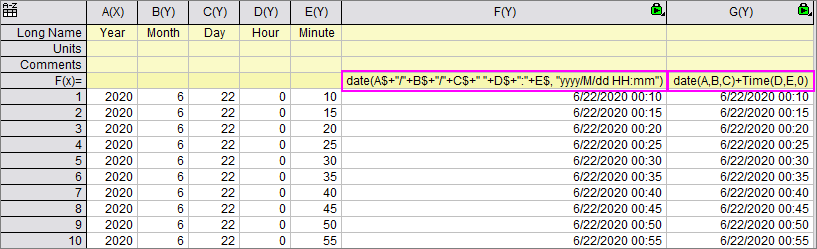
在上面的例子里,其中任何一个表达式都可以在你的 F(x)/设置值 公式起作用(还可以有其他):
//concatenate the 1st 5 columns as string and specify what date format the string is.
//It will return julian date
date(A$+"/"+B$+"/"+C$+" "+D$+":"+E$, "yyyy/M/dd HH:mm")

//date(year, month, day) returns integer part of julian date,
//time(hour, minute, second) returns fraction part of julian date.
//So they should be added together to get complete julian date
date(A,B,C)+time(D,E,0)
注意在第二个例子中 是需要的,。注意在第二个例子中 "0" 在 time(D,E,0) 是需要的,因为没有"秒"列。如果有这一列,这个例子会写成time(D,E,F).
F(x)/设置值会返回儒略日期值,你可以这样改变日期显示方式
- 双击列表头或者右击列表头并选择 属性....
- 设 格式 为 日期,把显示设为如 7/20/2021 HH:mm, 点击 确认.
Keywords:date, time, merge, combine date time, date and time functions, concatenate, 日期, 时间, 合并, 合并日期时间, 日期和时间函数, 并置