Origin's "2018" system allows for greater numeric precision when working with measurements made to fractions of a second. When working with contemporary dates, calculations involving measurements to 10-8 seconds can be supported.
Origin interprets dates based upon the Gregorian Calendar. Time is interpreted in hours:minutes:seconds. Origin supports the following date ranges:
Origin's mathematical system for date and time is based on the astronomical Julian Day, which defines January 1, -4712 (January 1, 4713 BCE), 12 hours Greenwich Mean Time as "time zero" (t0). However, Origin's system differs in employing a 12 hour offset (see next).
Origin's long-time, default date-time system establishes t0 as January 1, 4713 BCE (January 1, 4713 24:00:00 BCE or January 2, 4713 00:00:00 BCE) -- 12 hours later than the standard Julian t0 value.
In this system, Origin interprets a calendar date+time of ...
... as a date value of ...
To obtain a true astronomical Julian Date value, you must add 0.5 to Origin's value (0.5 days = 12 hours), yielding a value of 2450976.390984.
No assumptions are made about time zones or any time shifting scheme (such as Daylight Savings).
Starting with Origin 2019, Origin offers two alternate date-time systems - a true Julian Date system and a "2018" system in which t0 is defined as January 1, 2018 at 00:00, allowing for more precise handling of fractional seconds.
To use one of these alternate systems you have to change the value of System Variable @DSP. Further, this value is saved into the project and therefore you must set a value for every project in which you wish to use an alternate date-time system.
| Value of @DSP | Calendar Date | Internal Numeric | Comments | |
|---|---|---|---|---|
| 0 | 2018-07-26 13:35:00 | 2458325 | .56597222 | Origin’s long-time default (True Julian Date – 0.5) |
| 1 | 2018-07-26 13:35:00 | 2458326 | .06597222 | True Julian Date |
| 2018 | 2018-07-26 13:35:00 | 206 | .565972222222 | t0 = Jan 1 2018 00:00 |
| Origin's "2018" system allows for greater numeric precision when working with measurements made to fractions of a second. When working with contemporary dates, calculations involving measurements to 10-8 seconds can be supported. |
To choose an alternate default date-time system for your Origin software:
@DSP=value
| @DSP supports three options
|
Depending on your version of Origin, there are a couple of ways to convert between a Unix timestamp and a Julian Date:
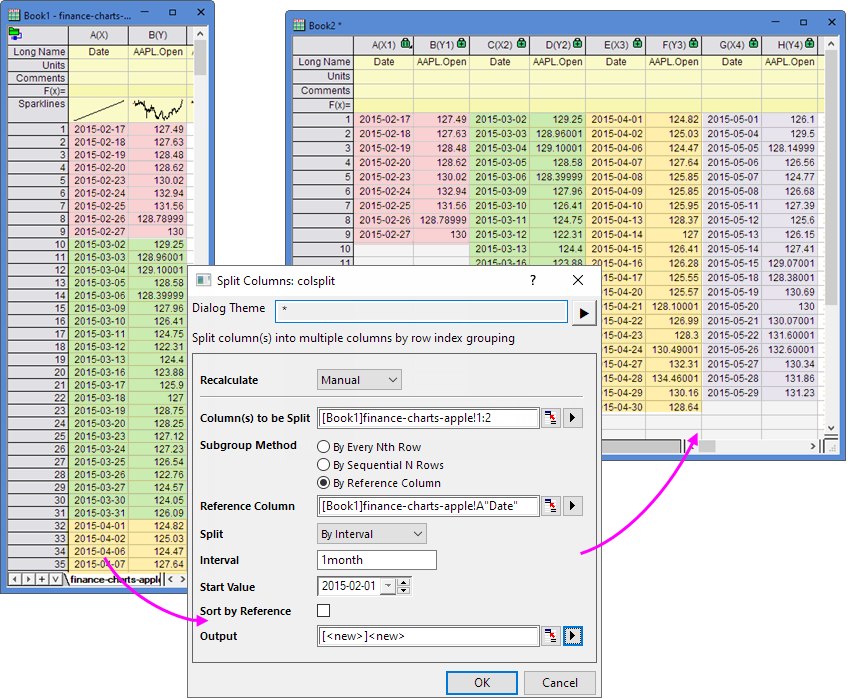
In some Statistics and Restructure tools, Origin supports to set the Date/Time interval to data processing. We can set second, minute, hour, day, week, month or year as Date/Time interval when the data source are data and time.
| Restructure tools | Statistics tools |
|---|---|

|
Here, we use Split Column tool as a sample. Based on date, how to split columns into February, March, April etc.
|