2.63 FAQ-504 如何减少 XY 或 XYZ 数据量?
Last Update: 7/14/2018
如果要减少 XY 数据列中包含的重复 X 数据,请选中 Y 列并选择 Analysis:Data Manipulation:Reduce Duplicated X Data 。此对话框调用的是 reducedup x-function。
如果要从 XYZ 数据列中删除重复的 XY 数据,可以使用 Statistics on Columns 工具,并按照下列步骤操作:
- 选择 Z 列,选择 Statistics:Descriptive Statistics:Statistics on Columns,此列将用作 Statistic on Columns 对话框的 Input 选项卡中的 Data Range 。
- 单击组 (Group) 控件中的箭头按钮以选择 X 和 Y 列作为分组数据。
- 转到 Quantities 选项卡,展开 Quantities 分支,然后选择要用哪些统计量替换重复值 (例如,最小、中值、最大值)。
- 如果还要输出替换的 XY 重复的数量,请在Moments 分支下勾选 N total 选项。
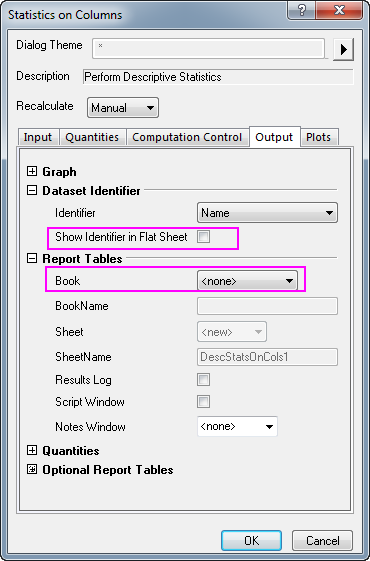
- 转到 Output 选项卡,在 Dataset Identifier 分支下,清除 Show Identifier in Flat Sheet 后面的复选框中的勾;在 Report Tables 分支下,从 Book 下拉菜单中选择 None 。
- 单击 OK 。 在报告工作表中,XYZ 的数据就是移除重复的 XY 之后的数据。
| 注意: 以上所述的 Statistics on Columns 方法也可用于删除 XYY 数据中重复的 XY。 |
Keywords:data reduction, remove duplicate, duplicate rows, data manipulation, nested columns, statistics on columns, reduce X, reduce X and Y,减少数据,删除重复,重复行,数据操作,嵌套列,统计列,减少 x,减少 x 和 Y