4.2.6 Protecting Origin Worksheets
WKS-Protect
From Origin 2023, you can lock a worksheet to protect it from misoperation such as overwriting cell values by mistake. Once a sheet is protected, a lock icon will present before its name both in sheet tab and Object Manager.
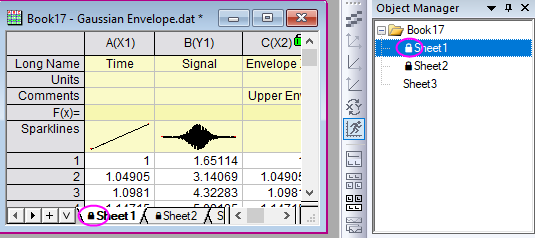
To protect a worksheet
- Click on the edge inside a worksheet to bring up the sheet level mini toolbar. And then select Protect Sheet button.
OR,
- Right click on the worksheet tab and choose Protect Sheet context menu.
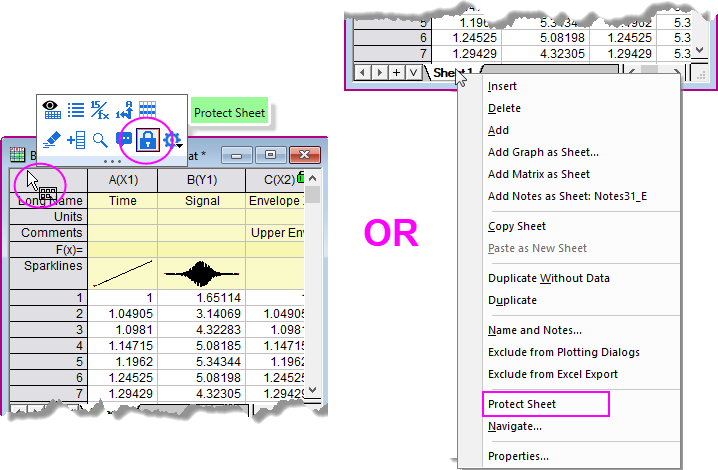
Both open the Protect Sheet Options dialog.
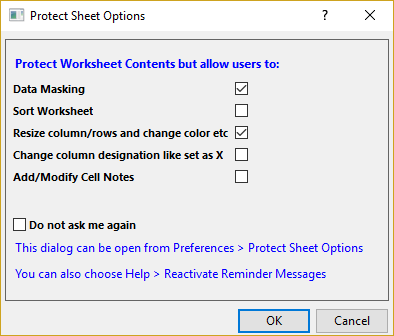
Protect Sheet Options
Basically Protect Sheet menu prevents the worksheet contents from being changed. But you can allow serveral exceptions from the Protect Sheet Options dialog.
Do not ask me again: If this checkbox is selected, the Protect Sheet Options dialog will not show again and <last used> options will be used. To change the options, you can:
- Select menu Preferences: Protect Sheet Options to open this dialog again. After change the setings in this dialog, you will need to unprotect the worksheet and protect it again to apply the new settings.
OR,
- Select Help: Reactivate Reminder Messages. When you protect the worksheet next time, the Protect Worksheet Options dialog will bring up again.
OR,