 button on the Worksheet Data toolbar.
There several ways to fill one or more worksheet columns with data:
| Note: The seeding algorithm for Origin's GUI methods of random number generation was changed for version 2016. For more information, see documentation for the system variable @ran. |
This simple procedure creates a dataset from row index numbers.
Select the column(s) you would like to fill, then do one of the following:
button on the Worksheet Data toolbar. This menu command fills the worksheet column with uniformly distributed numbers between 0 and 1.
Select the column(s) you would like to fill, then do one of the following:
 button on the Worksheet Data toolbar.
 Filled minimum and maximum values are determined by the UNIFORM_MIN and UNIFORM_MAX variables in the [FillColumn] section of the ORIGIN.INI file. By default, these variables are set to 0 and 1, respectively.
This menu command fills the worksheet column with normally distributed random numbers.
Select the column(s) you would like to fill, then do one of the following:
 button on the Worksheet Data toolbar.
 For the normal random number fill, the mean and the standard deviation are controlled by the NORMAL_MEAN and NORMAL_SIGMA variables in the [FillColumn] section of the ORIGIN.INI file. By default, these variables are set to 0 and 1, respectively.
Selected column(s) can be filled with numeric patterned data using the patternN dialog box.
To open this dialog, select the column(s) you would like to fill.
or
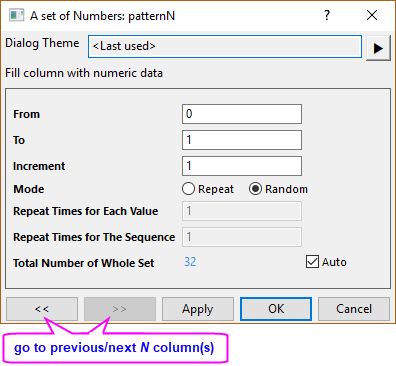
The following table summarizes the controls in the patternN dialog box.
| From | Specify the starting value of the generated data sequence. |
|---|---|
| To | Specify the ending value of the generated data sequence. |
| Increment | Specify the increment within the generated data sequence. |
| Mode | Specify how the generated data should be arranged.
|
| Repeat Times for Each Value | This text box is only controllable when Repeat is chosen for Mode. It specifies how many times each value repeats itself in the generated data sequence. |
| Repeat Times for The Sequence | This text box is only controllable when Repeat is chosen for Mode. It specifies how many times each whole data sequence repeats itself in the generated dataset. |
| Total Number of Whole Set | This text box is only controllable when Random is chosen for Mode(When Repeat is chosen, it is read-only). It specifies the total number of values in the whole dataset which will be generated based on the current settings. To change its value, you must clear the Auto box. |
A set of patterned date and time data can be output to the selected column(s) using the patternD dialog.
To open this dialog, select the column(s) you would like to fill.
or
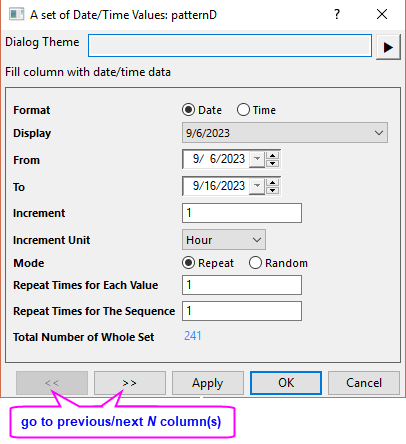
The following table summarize the controls in the patternD dialog box.
| Format | Specify the format of generated data.
|
|---|---|
| Display | Specify the display format of the date/time data. See this help file page for more information. |
| Custom Display | This combo box is only available when the Display is set to Custom Display. You can select or enter a custom format of the date/time data. See Custom Date and Time Formats for more information. |
| From | Specify the starting value of the generated data sequence. When Format is Date, it will be a combo box with calendar control; when the Format is Time, it will be a text box. |
| To | Specify the ending value of the generated data sequence. When Format is Date, it will be a combo box with calendar control; when the Format is Time, it will be a text box. |
| Increment | Specify the increment within the generated data sequence. The increment must be an integer. |
| Increment Unit | Specify the unit for the Increment value. The options in the drop-down are Second, Minute, Hour, Day, Week, Workday, Month, Quarter and Year (Month, Quarter and Year only availble when Format is set to Date). |
| Mode | Specify how the generated data should be arranged.
|
| Repeat Times for Each Value | This text box is only controllable when Repeat is chosen for Mode. It specifies how many times each value repeats itself in the generated data sequence. |
| Repeat Times for The Sequence | This text box is only controllable when Repeat is chosen for Mode. It specifies how many times each whole data sequence repeats itself in the generated dataset. |
| Total Number of Whole Set | This text box is only controllable when Random is chosen for Mode(When Repeat is chosen, it is read-only). It specifies the total number of values in the whole dataset to be generated based on current settings. To change its value, clear the Auto box. |
Patterned data consisting of arbitrary strings can be output to selected column(s) using the patternT dialog.
To open this dialog, select the column(s) you would like to fill.
or
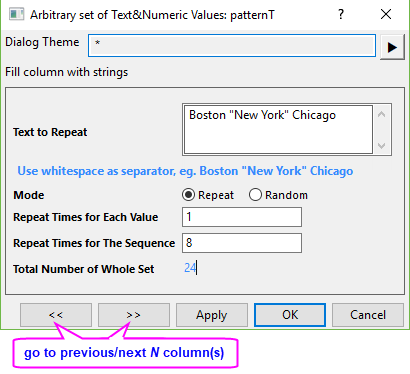
The following table summarize the controls in the patternT dialog box.
| Text to Repeat | Type in the values you want to output to the selected column(s). The values can be text or numbers. The separator between each value should be a space. To include a space in one value, use quotation marks to indicate one value. |
|---|---|
| Mode | Specify how the generated data should be arranged.
|
| Repeat Times for Each Value | This text box is only controllable when Repeat is chosen for Mode. It specifies how many times each value repeats itself in the generated data sequence. |
| Repeat Times for The Sequence | This text box is only controllable when Repeat is chosen for Mode. It specifies how many times each entire data sequence repeats itself in the generated dataset. |
| Total Number of Whole Set | This text box is only controllable when Random is chosen for Mode(When Repeat is chosen, it is read-only). It specifies the total number of values in the whole dataset which will be generated based on the current setting. To change its value, you first need to uncheck the Auto box. |
 | You can pre-select a group of cells, enter a number or text into the active cell, then press Alt + Enter to fill selected cells with a common entry. Non-contiguous selections are supported. |