
If you have experienced a crash or freeze -- something that prevented you from saving your project -- you may be able to recover the bulk of your work if Origin's Autosave feature is turned on. See this FAQ for details.
Last Update: 11/5/2025
If your Origin crashes, freezes, dialogs will not open, or is in some way not responding, here are some general troubleshooting solutions you should try. These solutions are supposed to be used in the order in which they are presented. If you try one of these solutions and it does not help, go to the next section.
| If you have experienced a crash or freeze -- something that prevented you from saving your project -- you may be able to recover the bulk of your work if Origin's Autosave feature is turned on. See this FAQ for details. |
If you have Origin version 9.1 or higher, you could send crash report directly after you experience crash. OriginLab will investigate on the details and follow up with you if you left an email address. To send crash report to tech support, click the Send Report button when you encounter this dialog:
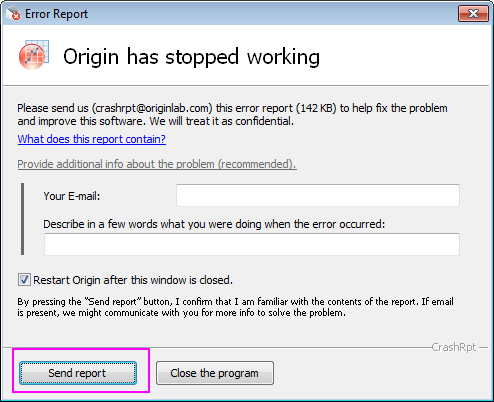
| Notes: Note that if you cannot directly send the crash report, you can click the What does this report contain link and export the crash report details as a zipped file and send the zipped file and any additional information to us later via email |
If you did not see the Crash Report dialog, go to Step 2.
If your Origin freezes, hangs or crashes without the Error Report dialog. You can send us the debug information with steps as below
Minidump mechanism is a recommended method which can help us to investigate what went wrong in your Origin.
Create a Minidump file and send to us with steps below.
If we have confirmed that minidump file does not help. You can send us the debug log file with steps below.
@log=1
|
Additional Notes:
|
If you have not experienced a hard crash, but still cannot run Origin normally, go to Step 3.
If Origin crashes after launching, it may be caused by missing or mismatched MS DLLs. Please try steps as below.
| Origin 2023b and later | Origin 2022b and 2023 | Origin 2022 and earlier |
|---|---|---|
If this does not work, go to Step 4.
There are some reports of HP printer driver conflicts, often manifesting as the following:
If you experience this, change your printer driver to another local default printer and restart Origin.
If this does not work, go to Step 5.
Check if there is a software conflict between Origin and other application (such as GamePP).
If this does not work, go to Step 6.
Make sure you have installed the most up-to-date patch (service release) available for your Origin version, or latest version available. You may use Help: Get Help Files/Check for Updates to check for a patch/version, or go to our website to download the patch/version as an EXE or ZIP file.
If this does not apply or if applying the patch does not resolve the problem, go to Step 7.
del -occleanIf deleting temporary files does not help, go to Step 8.
del -pathIf changing UFF does not fix the problem, go to Step 9.
Sometimes the crash is file-specific, for example if the project file is corrupted, it may lead to a crash or freeze.
In order to check whether the crash is caused by specific file(s), you can try to reproduce the crash behavior with a new Origin project file of a relatively small size.
If the crash is file-specific, you can Send the Corrupted File(s) to Support and ask for assistance.
If the crash is not file-specific, continue to Step 10.
Origin may behave incorrectly if the computer is infected with a virus. First make sure your anti-virus software is up-to-date and fully functioning, and then run a complete system check to see if this resolves the issue.
If the problem still exists after a complete system check, continue to Step 11.
Go to your list of installed program files (browse the Start menu or Apps list, depending on Windows OS), and double-click the shortcut OriginPro X.X Add or Remove Files. This launches the Origin Setup files (the shortcut name is version dependent). Select Repair/Upgrade as your goal and follow the setup wizard to repair your installation.
If repairing installation does not help, go to Step 12.
If none of the solutions above solve the problem, please contact tech support for help.
Keywords:crash, not responding, installation, crash report, stop working, freeze, repair, printer driver, corrupted, stall