5.44 FAQ-780 What should I do when Origin does not function for unknown reasons?
origin-not-work
Last Update: 11/18/2024
This Quick Help page provides a general routine to help users to self-diagnose the problem of Origin resulted from unknown reasons.
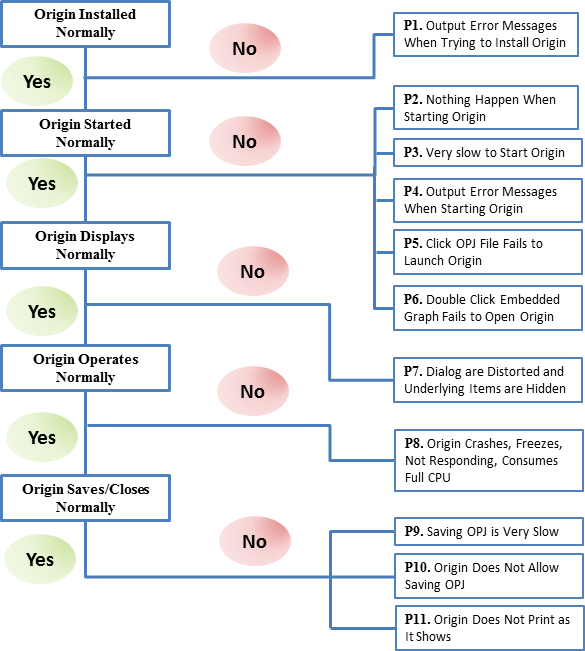
Origin Cannot be Installed Normally
P1. Output Error Messages When Trying to Install Origin
If you see an "error installing ikernel.exe" message when running the Origin Setup, this is usually caused by your Windows log in account not having installation permissions. Please refer to this Quick Help page for solutions.
Origin Cannot Start Normally
P2. Nothing Happens When Starting Origin
The first thing to do is to download the latest service release from this link, uninstall your current Origin and re-install with the newly downloaded installer. Make sure you have specified a new folder as User Files Folder during re-installation. If problem persists, you can find further solutions on this Quick Help.
P3. Very slow to Start Origin
Several reasons would cause this problem. Check the following situations one by one:
- If your User Files Folder (UFF) is set to a network path or roaming profile, change UFF to a local path.
- Sometime printer driver can mess with Origin, reset the default printer to another one on the local machine.
- If you have a Concurrent license and the Flexnet server locates far away (for example in another country), or in a network very slow to connect, Origin operation would heavily rely on the network status. To determine whether the network makes Origin slow to open in such case, try to break from network temporarily or borrow a license from server and then restart Origin, see if it starts faster.
P4. Output Error Messages When Starting Origin
- If you are receiving missing DLL error messages when starting Origin, it means the required Microsoft DLLs by Origin are missing on your computer. Please refer to this Quick Help page for solutions.
- If you are receiving "System Folder Build Failed", "X-Function failed to execute" error messages when starting Origin, you can refer to this Quick Help page for solutions.
P5. Click OPJ File Fails to Launch Origin
This issue started since Windows Vista and on and not unique to Origin. Usually the message is There is a problem sending the command to the program. It only happens on some PCs and we don't have a fix for this yet. This Quick Help has provided several ways that you can try to fix the issue.
P6. Double Click Embedded Graph Fails to Open Origin
If you encounter the situation that double clicking on the embedded Origin graph in Word/PowerPoint failed to open it in Origin, you can refer to this Quick Help page for solutions.
Origin Does Not Display Normally
P7. Dialogs are Distorted and Underlying Items are Hidden
When using a high resolution screen with large DPI setting (Medium-125% or Larger-150% in Windows Control Panel\Appearance and Personalization\Display page), you may encounter the situation that the layout of Origin dialogs are huddled together or the toolbar buttons are very tiny. Origin keeps improving the displayment on the high resolution sceens, see this FAQ for details. Please upgrade your Origin to the latest version. You can go to menu Help: Get Help Files/Check for Updates... to check if there is a new version available, or download new version installer (EXE or ZIP) or Service Releases patch from our website.
If you are using an old Origin version and don't want to upgrade at the moment, you can try to delete the registry entry that manages dialogs as descrbied in this Quick Help.
Origin Does Not Operate Normally
P8. Origin Crashes, Freezes, Not Responding, Consumes Full CPU, Fails to Export Graphs
- Origin crashes for various reasons, e.g., when using a specific tool, performing certain operation, working with a specific Origin project/workbook/graph, this Quick Help page provides a systematic routine in resolving crash issue.
- When working with Excel in Origin, sometimes Origin does not respond and show some Excel error messages. At this time, you may refer to this Quick Help page for solutions.
- If Origin does not function for unknown reasons, for example, no response when exporting graphs or choosing a menu, or shows message like External call execution error or Fail to find xxx.dll, please refer to this Quick Help page for solutions.
- When you notice a specific Origin project file occupies the computer's full CPU, or the size of an OPJ file is unreasonably large, you can follow this Quick Help page to solve it.
Origin Cannot Save/Close/Print Normally
P9. Saving OPJ is Very Slow
- If your Origin project size is very large, you may feel Origin is running slowly. The easiest way to speed up Origin is to break down your Origin project file into several smaller ones.
- If your Origin project size is not so large (within 100M Bytes), but when you try to save the file it takes unreasonably long (~ several minutes), most probably it is a problem related to the printer. For this situation, you can try to change the default printer to a different one and resave the Origin project to see whether problem persists or not.
P10. Origin Does Not Allow Saving OPJ
Sometimes you may encounter the situation that Origin will not allow you to save current opj file, meanwhile the error message Please close all open dialogs before closing Origin will pop-up. But at this time, you cannot find any dialog that is open and thus cannot close it. This Quick Help page has provided two solutions for you to try.
If your project contains one or more Excel book and encounter the error message that the project file failed due to an external Excel book saving failure on saving the project, please refer to this Quick Help page to solve the problem.
P11. Origin Does Not Print as It Shows
- The first step to do before printing is to switch to Print View (by menu View: Print View) to guarantee what you see is what will be printed on the paper.
- Sometimes what actually gets printed in the paper may differ from what you have expected, e.g., the layer dimension in printed page is incorrect, graph labels are shifting locations, etc,this Quick Help page provides solutions to each of the possible situations.
- If you export the graphs as EMF/PDF/EPS, or copy paste to Word or PowerPoint, the graph get cut off, shrunken, or have extra large margin, please refer to this Quick Help page for solutions.
Related Topics
Keywords:crash,fail to work,bug,fix,error messages, trouble shoot