4.2.2.8 Fitting One Dataset as a Function of Other Datasets
Contents
Summary
Sometimes, one may want to perform "Dataset Fitting", that is, the output may be composed of one or several datasets, like:

For example, you may want to analyze a composite spectrum to find the contributions/ratio from individual component spectra. This can be accomplished either by defining multiple independent variables or by calculating the "combination" inside the fitting function.
Minimum Origin Version Required: Origin 8.0 SR6
What you will learn
This tutorial will show you how to:
- Perform "Dataset Fitting"
- Define multiple independent variable fitting function
Steps
Import the Composite Spectrum.dat file from the \Samples\Curve Fitting\ folder. In this sample data, we can see that column A is the index, columns B and C are the values for the spectrum of components A and B. Column D contains values obtained after reading a composite spectrum of components A and B. By fitting column D to an equation determined by the component spectra of the pure forms of columns B and C, the coefficients for the contributions of B and C (call them c1 and c2 respectively) can be found. (Note: In this case, we supposed the independent and dependent variables have the same size. If not, interpolation is need.)
Bring up the Fitting Function Organizer and define a new fitting function as follow:
Function Name: MultiIndep Function Type: User-Defined Independent Variables: a, b Dependent Variables: ab Parameter Names: C1, C2 Function Form: Origin C Function: ab = C1*a + C2*b;
Initialize both C1 and C2 to 1 in the Parameter Initialization edit box by entering:
C1=1;
C2=1;
Save the fitting function and close Fitting Function Organizer. Highlight ONLY Column D and bring up the NLFit dialog, specify the input datasets in the Data Selection page as follow:
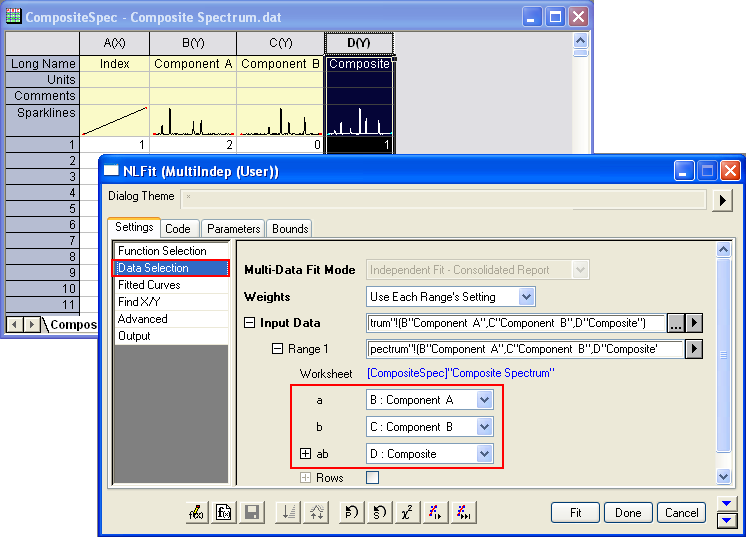
Then you can click the Fit button to generate results.
Results
You are supposed to get these results:
Value Standard Error C1 0.37169 0.00483 C2 0.66469 0.0047
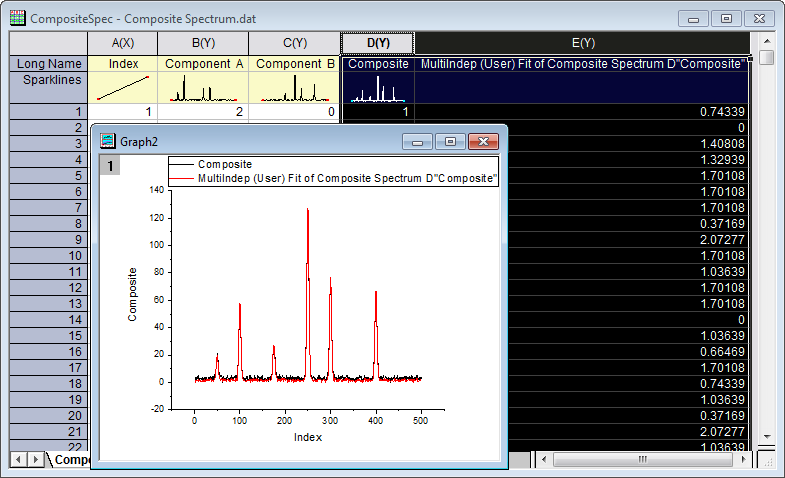
To verify the fitted results, you can add a new column and Copy + Paste the fitted value, which comes from the fitted Y (col(C)) in the worksheet FitNLCurve1, into it. Then Highlight the Composite and the fitted data and plot a line graph to see how good the fit is:
- Nonlinear Curve Fit Tool
- Nonlinear Fitting with System Function
- Global Fitting with Parameter Sharing
- Global Fit for Different Functions with Shared Parameters
- Parameters Initialization using LabTalk in NLFit
- User Defined Fitting Function
- Fit Surface with User Defined Function
- Fitting One Dataset as a Function of Other Datasets
- Fitting With Multiple Independent Variables
- User Defined Fitting Function using GNU Scientific Library