提示:此部分只提供英文原文,敬请谅解!
5.88 FAQ-1190 How to turn on/off Dark Mode?
Last Update: 11/27/2023
Dark Mode is supported from Origin 2024. By default, if your OS window color is set to Dark Mode, Origin will also launch in Dark Mode.
|
Dark Mode OS Requirement
|
If your Origin launches in Dark Mode but you want Light Mode, or vice versa, you can set it inside Origin.
To turn off Dark Mode
- Set system variable @CTP to 0. That is,
- Select menu Window: Script Window.
- In the Script Window that opens, enter following script and press Enter key to run:
@CTP =0
Note that system variable @CTP is register-based so the settings will be kept across instances.
OR, - Use Dark Mode toolbar buttons. That is,
- Click Toggle GUI button
 on the Dark Mode toolbar.
Note that Dark Mode toolbar provides more options to switch between modes.
- Click Toggle GUI button
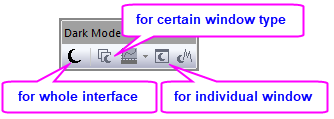
If you cannot find the Dark Mode toolbar, e.g. closed it by mistake when launched Origin first time ,
you can find it back as follow:
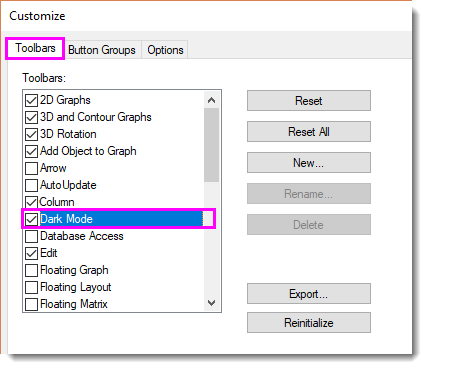
- Select menu View: Toolbars...
- In the Customize dialog that opens, activate Toolbars tab. Find and check Dark Mode in the list.
Keywords:dark mode, light mode, color theme preference, change window color