2.143 FAQ-1223 如何创建 Google client_id 以使用 Origin 的 Google Drive 云工具?
Last Update: 11/12/2025
Google Drive 云工具(连接到云菜单和打开云文件工具栏按钮)默认使用 Origin 的 client_id。所有 Origin 用户共享此权限。Google 对访问数量设置了全局限制,目前已达上限,Origin 暂时无法增加数量。
以前未曾访问过的用户无法使用 Origin 的 client_id 访问(曾经成功访问过的用户仍然可以访问)。
如果你看到如下的错误信息:
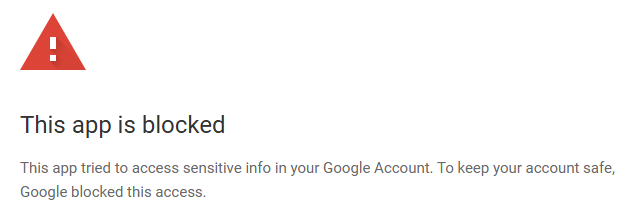
可以尝试:
- 根据以下步骤创建自己的 client_id :
- 使用你的 Google 账号登录 Google API Console (不需要和登录 Origin 云连接器的用户名相同)。
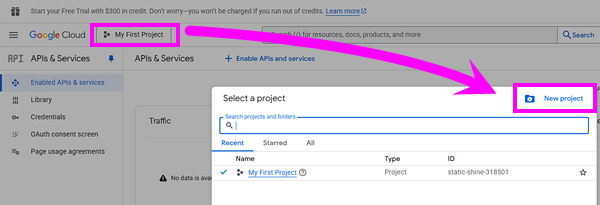
- 点击左上角的 "project" 按钮,然后在弹出的对话框点击 "New project" 按钮去创建新项目。
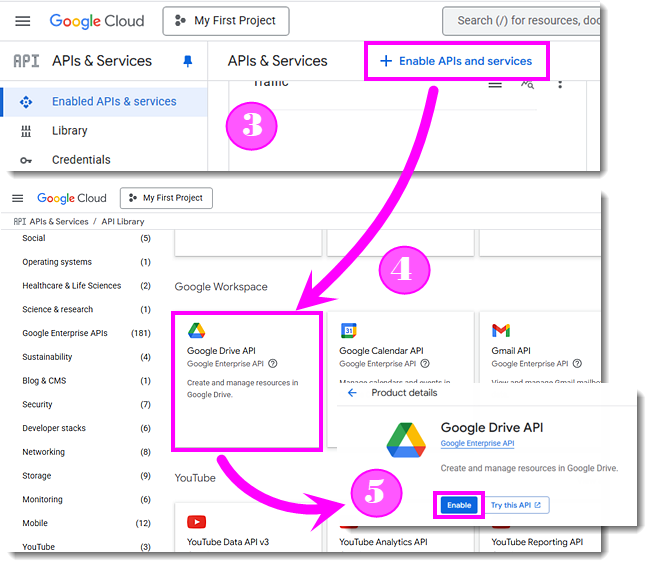
- 在左侧菜单点击 "APIs & services" > "Enable APIs and services"。
- 在 API Library 找到 "Google Drive API" 并点击。
- 在 "Product details" 页面点击 Enable 按钮。
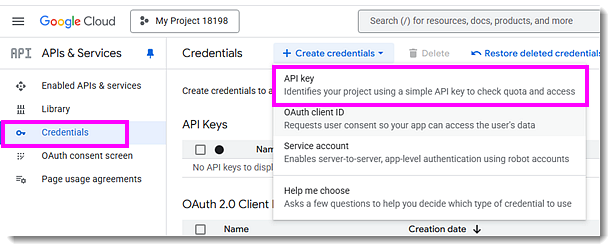
- 在左侧面板点击 "Credentials",然后在顶部点击 "+Create credentials",在弹出菜单里选择 "API key"。
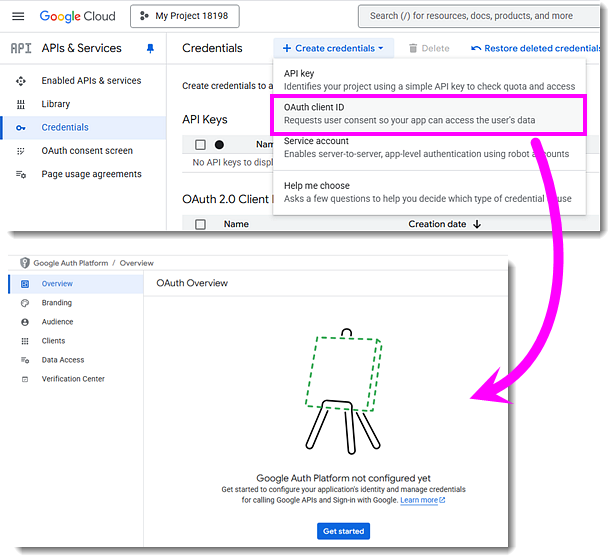
把弹出对话框上的 "API key" 记下来。 - 再次点击 "+Create credentials" 然后选择 "OAuth client ID"。点击 "Configure Consent Screen"。在 "OAuth Overview" 页面点击 Get started 按钮设置项目配置。
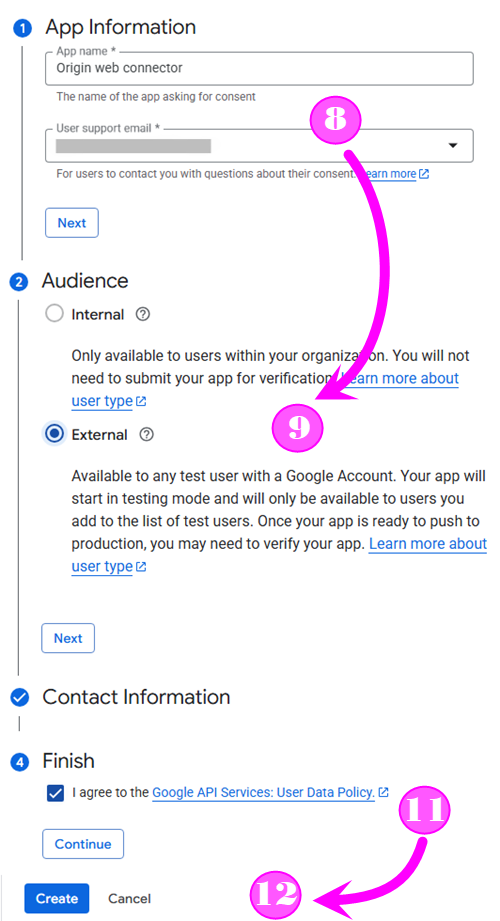
- 在 "Project configuration" 页面输入应用程序名称,如 "Origin web connector"。 然后在 "User support mail" 编辑框选择当前账号。 点击 Next 按钮。
- Audience 选 "External",点击下一步。
- 在 "Developer contact information" 输入电子邮箱地址,然后点击下一步。
- 查看并同意 "Google API Services User Data Policy",然后点 "CONTINUE" 按钮。
- 点击 "Create" 按钮。
- 点击 "Create OAuth client" 按钮。
- 应用程序的类型选择 "Desktop app" ,然后设一个名字(可以使用默认的),点击 "Create" 按钮。
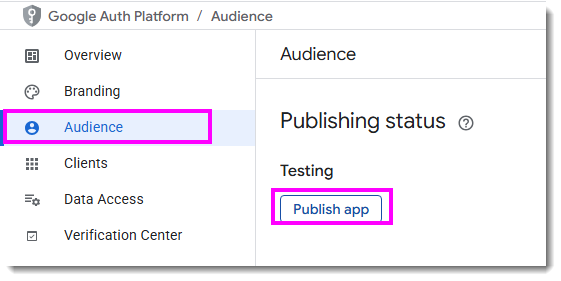
把弹出对话框上的 "Client ID" 和 "Client secret" 记下来。 - 在左侧面板选择 "Audience",然后点击 "Publish app" 按钮。在弹出对话框点 "Confirm" 按钮。
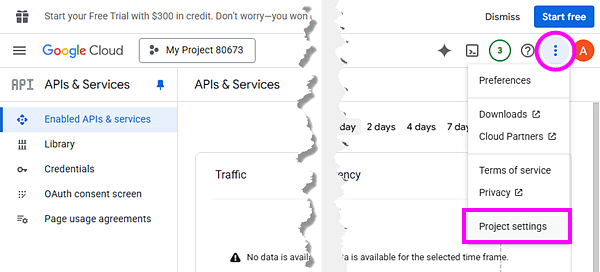
- 通过左上角的导航菜单回到 "APIs & Services" 页面。
- 在右上角点击 "..." 按钮,然后选 "Project settings"。
记下这个项目号码(AppID)。
- 确保 关掉了 Origin。更新
<Origin UFF>/OCloud.ini(如果没有就创建这个 ini 文件)。
其中的 [GoogleDrive] 章节如下:[GoogleDrive] AppID=USER_APP_IDD ClientID=USER_CLIENT_ID ApiKey=USER_API_KEY ClientSecret=USER_CLIENT_SECRET
- 如果你想云连接到 Googlesheet,还需要做这些步骤:
- 回到 Google API Console。
- 在左侧面板选 "Enabled APIs & services",然后点击 "Enable APls and services"。
- 搜索 "Google Sheets API"
- 点击 "ENABLE"。

- 现在打开 Origin 尝试连接。
Keywords:连接到 Google, connect to Google, 从 Google Drive 导入, import from Google Drive, 云连接器, cloud connector, Google API 密钥, Google API Key, 此应用已被屏蔽, This app is blocked, 试图访问 Google 帐户中的敏感信息, tried to access sensitive info in Google Account, 保护账号安全, keep account safe, Google 已阻止此访问, Google blocked this access