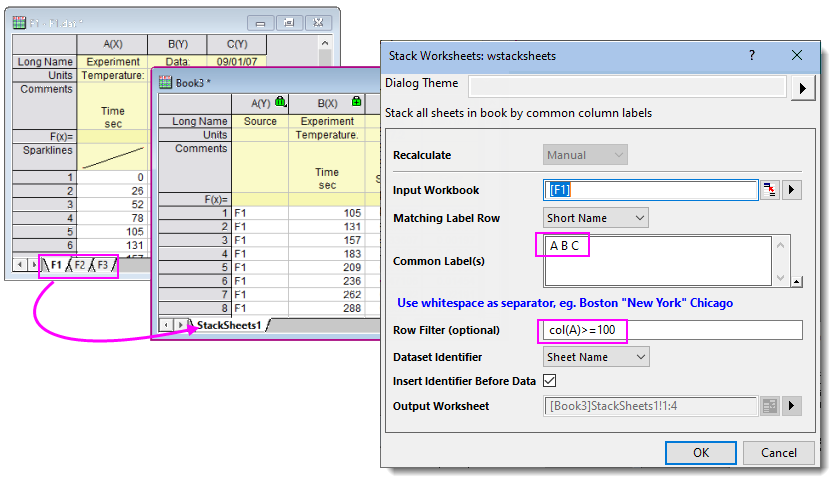
The Stack Worksheets tool (Restructure: Stack Worksheets, X-Function = wstacksheets) stacks one or more columns common to two or more sheets in the active workbook, to an output sheet by row identifier (e.g. Sheet Name).
| Recalculate | Specify the Recalculate Mode for this operation. |
|---|---|
| Input Workbook | The active workbook. Otherwise, specify the Input Data. |
| Matching Label Row | Common column label row element(s) used to stack data columns to Output Worksheet. |
| Common Label(s) | Key names or text strings in Matching Label Row. Multiple labels should be space-separated. Enclose names or strings that contain spaces, with double-quotes. |
| Row Filter (optional) | Filter stacked data using a LabTalk expression (e.g. col(A)>=100). |
| Dataset Identifier | Specify how to identify source for each row of stacked output. |
| Insert Identifier Before Data | Check this box to insert the Dataset Identifier in the first column; otherwise output to last column in Output Worksheet. |
| Skip Hidden Sheets | Check this checkbox to exclude hidden sheet(s) in Input Workbook from stacking. You can hide a worksheet in the Navigate Worksheets dialog. |
| Output Worksheet | Specify where to send data output. Default choices are to a new sheet <new> or new book [<new>]. |