29.18.8 Split Heatmap
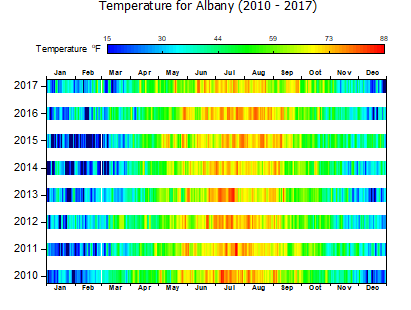
Split-Heatmap
Data Requirements
- Worksheet: Select XY columns or XYZ columns (full or subrange); or a virtual matrix.
or
- Matrix: A matrix of Z values.
Creating the Graph
- Activate the matrixsheet or select required data from worksheet.
- From the menu choose .
- If plotting from a virtual matrix, in the plotvm dialog box that opens, set the Y values in drop-down, Column Label source (if needed) and set X Values in. Determine what you want for axis titles and click OK.
Template
SplitHeatMap.OTPU
Notes
- This plot is most easily created from a virtual matrix. The plotvm dialog box allows you to specify a column label row to be used in labelling each horizontal "bar" in the plot.
- Data in the X column must be monotonic.
- To modify spacing between "bars", activate the graph and choose Format: Plot. Click the Spacing tab and adjust the Gap Between Cells in Y Direction slider.
- To see how the plot depicted above is made, press F11 to open the Learning Center and search for "heatmap".
- This plot type shares controls with the standard Heatmap and the Heatmap with Labels.