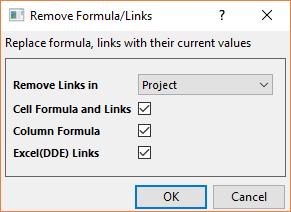
One can insert links or formula in Origin worksheet for recalculation or auto-update. Those who do not use these tools don't need to concern themselves with disabling the feature. However, those who do use these tools may find that it suits their workflow to disable the linked cells/columns and that is the purpose of this dialog.
To open this tool:
This dialog is used to replace formula, links with their current values.
| Remove Links in | Select to remove formula and links in the scope of
|
|---|---|
| Cell Formula and Links | Check this to replace cell formula and links with their current values. |
| Column Formula | Check this to remove column formula and keep the current column values. |
| Excel(DDE) Links | Check this to replace Excel DDE links with their current values. |