| Cluster
|
Specify the type of objects to cluster.
- Cluster observations. Rows in the input data are classified into groups.
- Cluster variables. Columns in the input data are classified into groups.
Note that for different types of objects to cluster, available distance types are also different.
|
| Cluster Method
|
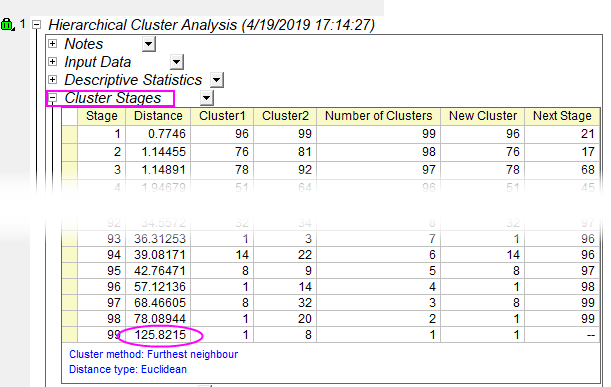
Select the linkage method to calculate the distance between a cluster and a new cluster. Six methods are available.
- The minimum of two distances between a cluster and two clusters merged to a new cluster. Also called single linkage.
- The maximum of distances between a cluster and two clusters merged to a new cluster. Also called complete linkage.
- The mean of two distances between a cluster and two clusters merged to a new cluster.
- Clusters are produced that maximize the distance between the centers of clusters.
- The median distance between an item in one cluster and an item in the other cluster.
- Clusters are produced that minimize the within-cluster variance.
To learn more about linkage methods, see the algorithm of linkage methods.
|
| Distance Type
|
Select a distance type in the Hierarchical Cluster Analysis.
For observations to cluster, three methods are available:
- The square root of the sum of the squared differences between two observations.
- The sum of the squared differences between two observations.
- The sum of the absolute differences between two observations. Also known as Manhattan distance.
- The difference between 1 and the cosine coefficient of two observations. Cosine coefficient is the cosine of the angle between two vectors.
- The difference between 1 and the correlation of two observations.
- The difference between 1 and the Jaccard coefficient of two observations. For binary data, Jaccard coefficient equals the ratio of sizes of intersection and union of two observations.
For variables to cluster, two methods are available. Missing values are excluded in a pairwise manner to calculate the correlation.
- The difference between 1 and the correlation of two variables.
- The difference between 1 and the absolute correlation of two variables.
To learn how to calculate distance, see the distance algorithm.
|
| Standardize Variables
|
Specify the method to standardize variables. Available only when objects to cluster are observations.
- Variables are not standardized.
- Z scores (standardize to N(0, 1))
- Variables are standardized with zero mean and unit standard deviation.
- Variable are standardized in the range of 0 and 1.
|
| Number of Clusters
|
Specify the number of clusters. The value should be greater than 0 and no more than the number of effective observations (cluster observations) or variables (cluster variables).
|
| Find Clustroid by
|
Specify the method to find the clustroid: the most/least representative variable/observation
- Find Clustroid using the sum of distances measured from all other observations/variables in the cluster. In a cluster, the most representative variable/observation would have the minimum Sum of distances; the least representative variable/observation would have the maximum Sum of distances.
- Find Clustroid using the Maximum distance among all distances measured from other observations/variables in the cluster. In a cluster, the most representative variable/observation would have the smallest Maximum distance; the least representative variable/observation would have the biggest Maximum distance.
- Sum of squares of distances
- Find Clustroid using the sum of the squares of distances measured from all other observations/variables in the cluster. In a cluster, the most representative variable/observation would have the minimum Sum of squares of distances; the least representative variable/observation would have the maximum Sum of squares of distances.
|