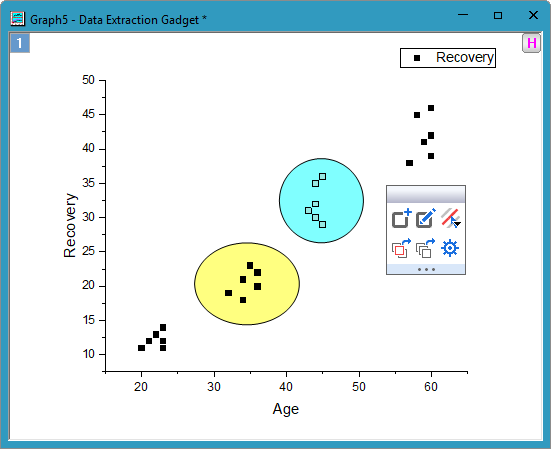
The Data Extraction gadget can help you extract the data points in a ROI region from the 2D graph to the target worksheet. It supports to extract different point subsets from different ROI regions.
To use Data Extraction gadget
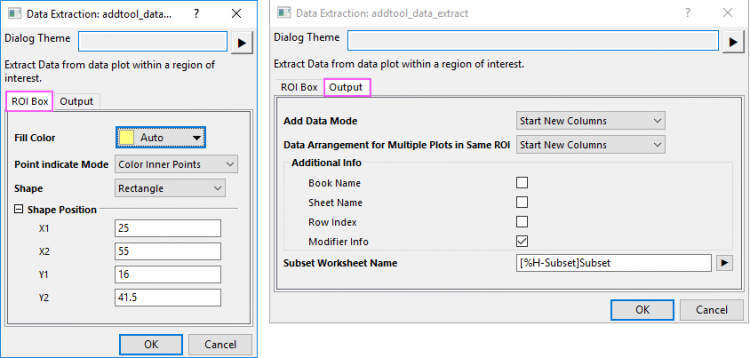
In this tab, you can customize the ROI box:
Specify the fill color for the ROI box.
When you select Auto, fill color will automatically change if you add more ROI box with the mini toolbar  . If you select a single color, all ROI boxes will share same fill color.
Specify how to indicate the inner/outer points once ROI box has been added.
Specify the shape of the ROI. It can be either Rectangle, Circular or Arbitrary Shape. See the details about these shapes here.
This group of settings allows you to set the precise position of the ROI. If Circular is selected in the Shape drop-down list, the settings below actually define a rectangle whose sides lie tangent to the circular ROI.
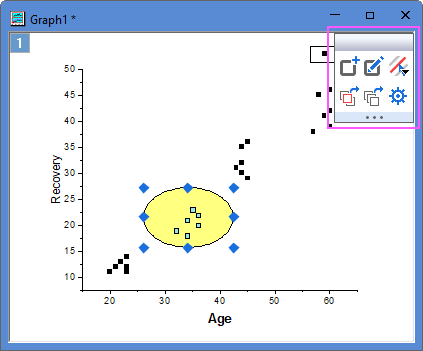
Once you click OK button in the Data Extraction: addtool_data_extract dialog, a ROI box be added and a mini toolbar will appear:
Click it to open Create ROI Dialog to add one more ROI box.
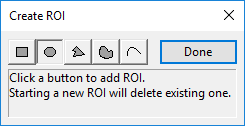
You can choose shape for ROI box and the fill color will automatically change for new ROI if Fill Color is set to Auto.
Click it to enter edit point mode for selected ROI to do further change. Single-click empty space will exist the modify mode.
Click this Fly-out button to list individual plots that can be checked/unchecked. The 1st two options are Active Plot and All Plots(show separator between individual plots). Default is active plot. It will pick data for all ROI.
Click this button to copy data of selected plot in active ROI/all ROIs to a specified sheet.
Click this button to open the Output tab of Data Extraction Preperences dialog.