2.2.1 Origin Child Window Naming Conventions
ChildWindow-Names
In this topic, we introduce the concept of the Short Name and Long Name. Each Origin child window has a name that uniquely identifies the window. Window names do more than merely cue the user as to window content. They are used by Origin, itself, throughout the user-interface, at the Command Window command line, and in Origin C programs and LabTalk scripts, as a means to partially identify the data being operated on.
Origin child window Short Names
Rules for window Short Names:
- must be unique (within the project).
- cannot contain spaces.
- must begin with a letter.
- limited to letters and numbers (not !,@,#,$,%,^,",etc.).
- limited to 13 characters.
| Child Window
|
Default Short Name
|
|
workbook
|
BookN
|
|
matrix
|
MBookN
|
|
graph
|
GraphN
|
|
function graph
|
FunctionN
|
|
layout
|
LayoutN
|
Origin child window Long Names
Rules for child window Long Names:
- need not be unique.
- can contain spaces.
- can begin with a letter, number or special character. Please note that special characters,such as !,# may prevent constructing LabTalk ranges by long name that refers to this child window.
- length is not restricted.
Note that there are no default Long Names.
Naming (renaming) and labelling Origin child windows
- To name or label an Origin workbook, matrix, graph, function graph, layout, and notes window, activate the window and then select Window: Properties.
- or
- Right-click on the window's title bar and select Properties from the shortcut menu.
- In the Window Properties dialog box, enter the Long Name, Short Name, and Comments.
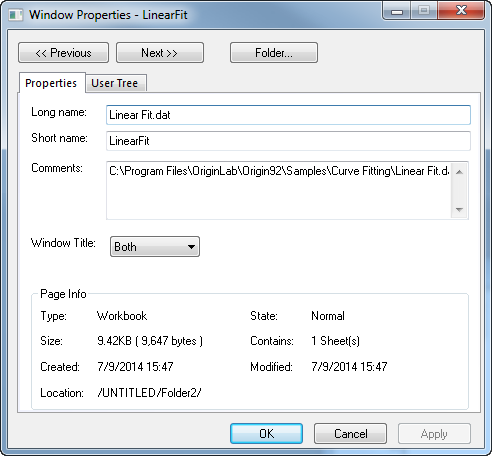
- Enter multiple lines in the Comments field, pressing ENTER at the end of each line.
- Specify which names you wish to display in the window title bar.
Note that the Origin default behavior is for the window Short Name to "track" the Long Name, regardless of whether you choose to display the Long Name in the window title bar (see the next section for details).
For more information on dataset naming conventions and the control of window naming behavior, see the following topics and subtopics:
How Origin uses child window Long Names and Short Names
- When performing operations, it is the Short Name that Origin uses -- regardless of whether it is the Short Name, Long Name or Both that is displayed in the child window title bar.
- Note that if the Auto update page Short Name to follow Long Name check box on the Miscellaneous tab of the Options dialog box (Preferences: Options) is selected, when you open a fresh child window and change the Long Name, the Short Name tracks the Long Name, removing any spaces and special characters and truncating to 13 characters, if necessary. This name auto-tracking feature is turned off by default.
- Also in the Options dialog box (Preferences: Options), Miscellaneous tab, there is a check box marked Use Long Names when available, which is selected by default. This check box causes Origin to display the Long Name throughout the user interface, wherever dataset names appear (the menu, the menu, the Plot Details dialog box, etc.).
When opening Origin project files created with versions 7.5 and earlier
When opening older OPJ files with Origin 8:
- Worksheet and matrix windows created with Origin 7.5 and earlier are opened in Origin 8 as single-paged workbook or matrix windows.
- Workbook and matrixsheet names did not exist in Origin 7.5 (and earlier), so by default, sheets remain unnamed in the Origin 8 workspace (you can rename them after opening).
| Previous Versions (Origin 7.5 and earlier)
|
Origin 8
|
|
Worksheet/Matrix/Graph Name
|
Short Name
|
|
Worksheet/Matrix/Graph Label, first line
|
Long Name
|
|
Worksheet/Matrix/Graph Label, second line, etc.
|
Comments
|
|
--
|
Workbook/Matrixsheet Name
|
|
Worksheet Column Name
|
Worksheet Column Short Name
|
|
Worksheet Column Label, first line
|
Worksheet Column Long Name
|
|
Worksheet Column Label, second line
|
Worksheet Column Units
|
|
Worksheet Column Label, third line, etc.
|
Worksheet Column Comments
|
Naming Excel workbook windows
For rules on naming of Excel workbook windows in the Origin environment, see Working with Excel Books inside Origin.