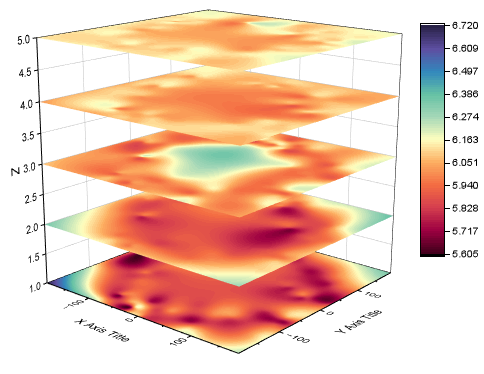
29.16.14 3D Stacked Surfaces
3D-Stacked-Surfaces
Data Requirements
- Plotted from Worksheet,
- (1)You need have XYZ data and another reference column to split the XYZ columns into different groups.
- (2)You need have XYZZ... data and a column label row to position the heatmaps on Z axis.
- Plotted from Matrix,
- You need have at least three matrix objects in the same matrixsheet.
Creating the Graph
Activate the worksheet or matrixsheet.
From the menu, choose .
- For the worksheet data, The dialog plot_xyz3dstack will be opened, same as that for 3D Stacked Heatmaps.
- For the matrix data, Origin will plot the matrix objects as flat surfaces directly.
Template
glStackedSurf.OTPU
(Installed to the Origin program folder).
Notes
- All the surfaces are flatted, and the position values on Z axis are controlled by the option Z Value Source.
- If your worksheet data is not Regular or Sparse, you can plot XYZZ... data as 3D Colormap Surfaces directly(Plot > 3D : 3D Colormap Surface) and then set them to Flat Surfaces.