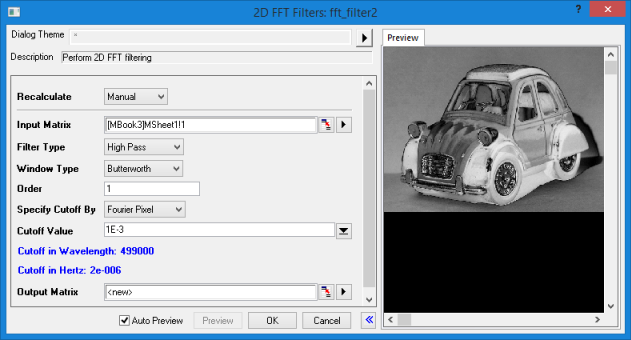
- Menu Command: Analysis: Signal Processing: 2D FFT Filters
- Window Type: Matrix containing image that has been converted to data (Image: Conversion: Convert to Data).
- X-Function Script and GUI Examples: fft_filter2
| Dialog Theme | See Dialog Themes. |
|---|
| Recalculate | |
|---|---|
| Input Matrix |
Specify the input matrix. Images should be converted into matrix data before applying 2D FFT Filter analysis. See Specifying Your Input Data. |
| Filter Type |
Specify the filter type.
|
| Window Type |
Specify the window type for 2D FFT filters. When Filter Type is set to Threshold, Window Type will not be shown in the dialog.
|
| Order | The filter order is a positive integer, whose default value is 1. This option is available only when Window Type is set to Butterworth. |
| Truncate Window | This option is available only when Window Type is set to Blackman. It is used to specify whether to do zero cutoff. |
| Specify Cutoff By |
Specify a way to define the cutoff value. When Window Type is set to Blackman, Specify Cutoff By will not be shown.
|
| Cutoff Value |
This option is available only when the Filter Type is either Low Pass or High Pass. It specifies the cutoff value. |
| Lower Cutoff Value |
Only available when the Filter Type is Band Pass or Band Block. Specifies the lower cutoff value. |
| Upper Cutoff Value |
Only available when the Filter Type is Band Pass or Band Block. Specifies the upper cutoff value. |
| Lower Threshold |
Only available when the Filter Type is Threshold. Specifies the lower threshold value. The value should be between 0 and 1. |
| Upper Threshold |
Only available when the Filter Type is Threshold. The value should be between 0 and 1, and must be greater than the Lower Threshold value. |
| Output Matrix |
Specify the output matrix, after processing by 2D FFT Filters analysis. See Output Results. |
For more details about each option in the controls of the 2D FFT Filters dialog, see Algorithm of 2D FFT Filters.