3.9.13 @Options in Substitution Notation
Contents
This page builds a complete list of all available @options used in the %( ) String Substitution, which are used to do real-time subsitution of various bits of information, including plot/worksheet metadata, workbook, sheet info, predefined variables, and special cell value, etc.
They can be used in many places including axis titles, legend, text labels and in many dialog. The Examples section at the bottom shows some usage in places other than the typical legend, axis title and text label on graph. For their usage in legend, axis title and text labels, please refer to following pages:
List of @Options
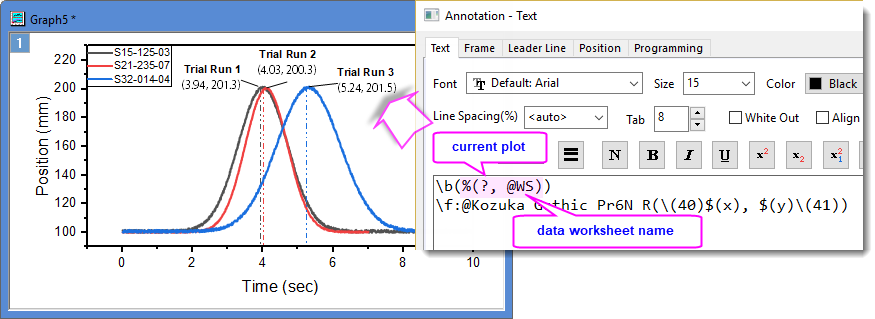
Below tables of available @ text-label options in %( ) substitution notation. %(1) used in many examples to refer to 1st plot in graph since most %( ) substitution notations are used on graph to access plot's corresponding data's metadata, worksheet, workbook information such as the image below. Note: %(1Y) refers to 1st plot's Y data. %(?) refers to current plot. %H refers to current window.
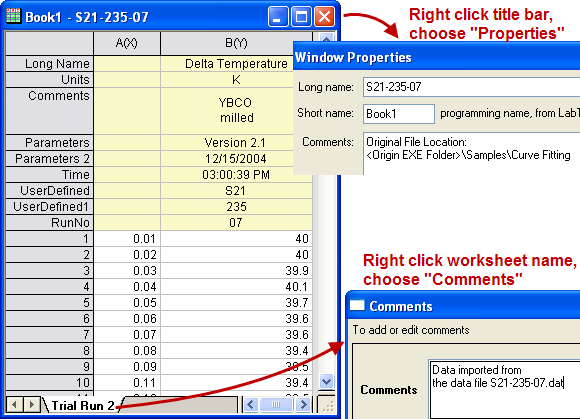
Column Label Rows
| @ Option | Substitute Text From.. | Example |
|---|---|---|
| @LS / @C | Column Short Name | %(1,@LS) --> B %(1,@C) --> B |
| @LA | Long Name, if available, else Short Name. | %(1,@LA) --> Delta Temperature |
| @L / @LL | Long Name, will return to missing value if long name does not exist. Equivalent to @LL. | %(1Y,@L) --> Delta Temperature %(1,@LL) --> Delta Temperature |
| @LG / @U | Long Name (if not available then Short Name) and Units (if present). Equivalent to @LG | %(1,@LG) -->Delta Temperature (K) %(1,@U) -->Delta Temperature (K) |
| @LC | Comments, if available, else Long Name, otherwise Short Name | %(1,@LC) --> YBCO milled |
| @LC[n] | The nth line of the Comments label row cell. Note that n is optional and that @LC1 = @LC. | %(1,@LC2) -->milled |
| @LM | 1st line of Comment, if available, else Long Name, otherwise Short Name. | %(1,@LM) --> YBCO |
| @LN | 1st line of Comments (if not available then Long Name, otherwise Short Name) and Units. Equivalent to @(@LM(@LU)). | %(1,@LN) --> YBCO(K) |
| @LU | Units | %(1,@LU) --> K |
| @LUP,@LUS,@LUA,@LUC | Add brackets to Units. Parentheses = (), Square brackets = [], Angle brackets = <>, Curly brackets = {} | %(1,@LUA) --> <K> |
| @LD | The first user-defined parameter | %(1,@LD) -->'S21 |
| @LD[n] | The nth user-defined parameter. Note that n is optional and that @LD1 = @LD.
(2025)n=0 for the last user-defined parameter. |
%(1,@LD2) -->235 |
| @LD"name" | The user-defined parameter of specified name. | %(1,@LD"RunNo")-->07 |
| @LF[n] | The filter condition of the data plot. When there are multiple conditions, optional n = the nth line of filter condition (list order shown in Filter label row cell). Also, see LabTalk system variable @SFD | Make = %(1,@LF)-->Buick
|
| @LH | The name of the first User-Defined Parameter. | %(1,@LH) -->UserDefined |
| @LH[n] | The name of nth User-Defined Parameter. Note that n is optional and that @LH1 = @LH.
(2025)n=0 for the last user-defined parameter. |
%(1,@LH3) -->RunNo |
| @LP | The first System Parameter. | %(1,@LP) --> Version 2.1 |
| @LP[n] | The nth System Parameter. Note that n is optional and that @LP1 = @LP. | %(1,@LP2) --> 12/15/2004 |
| @LQ | The first User-Defined Parameter and Units (if available). | %(1,@LQ) --> S21(K) |
| @LQ[n] | The nth User-Defined Parameter and Units (if available). Differs from @LH by including Units. Note that n is optional and that @LQ1 = @LQ. | %(1,@LQ2) --> 235(K) |
| @LQ"name" | The User-Defined Parameter (specified by name) and Units (if available). | %(1,@LQ"RunNo") --> 07(K) |
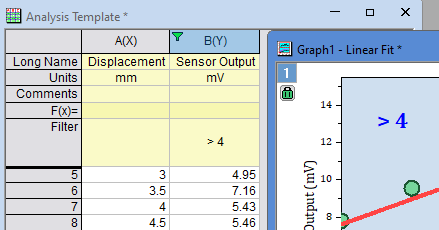
Workbook Information
| @ Option | Substitute Text From.. | Example |
|---|---|---|
| @WL / @PL | Long Name of book (workbook, matrix) |
|
| @W / @PN | Short Name of book (workbook, matrix) |
|
| @PC[n] | The nth line of the WorkBook Comment.
for @WC, if optional n is not specified, only the first line will be shown. for @PC, if optional n is not specified, all the comments will be shown. |
Origin File Location
|
| @WS / @SN | Name of the sheet (workbook, matrix) |
|
| @WNL / @SNL | Long Name of sheet (workbook, matrix) |
|
| @WNS | Short Name of sheet (workbook, matrix) |
%(1,@WNS) -- See LabTalk System Variable @SSL |
| @WM[n] | The nth line of the WorkSheet Comment. If optional n is not specified, only the first line will be shown. | %(1,@WM) -->Data imported from |
| @WN | The contents of the cell Note. |
|
| @WP | Project Explorer (PE) path of the book (workbook, matrix) |
%(1,@WP) -->/Folder1/ |
Worksheet Column Information
| @ Option | Description | Example |
|---|---|---|
| @# | Returns the total number of columns in worksheet. |
|
| @CS | Returns the column index of the first selected column to the right of (and including) nth column. Return 0 if not found |
|
| @E# | If argument = 1, returns the number of Y error columns in the worksheet. If argument = 2, returns the number of Y error columns in the current selection range. If argument is omitted, it's assumed to be 1. |
|
| @H# | If argument = 1, returns the number of X error columns in the worksheet. If argument = 2, returns the number of X error columns in the current selection range. If argument is omitted, it's assumed to be 1. |
|
| @OY / @OYY | Returns the offset from the 1st selected Y column to the nth Y column to its right in selection. The nth Y must be in selection as well. |
|
| @OYX | Returns the offset from the left-most selected Y column to the n+1th selected X column to its right in selection. The nth X must be in selection as well. |
|
| @SCn | Returns the nth row of worksheet comments. If n is skipped, it's the 1st row of comments | |
| @X | Returns the column index of the first X column in worksheet |
|
| @Xn | Returns the column short name of the first X column in worksheet. |
|
| @Y- | Returns the column index of the closest Y column to the left of nth column. Returns 0 if not found. |
|
| @Y# | If argument = 1, returns the number of Y columns in the worksheet. If argument = 2, returns the number of Y columns in the current selection range. If argument is omitted, it's is assumed to be 1. |
|
| @Y+ | Returns the column index of the closest Y column to the right of nth column. Returns 0 if not found. |
|
| @YS | Returns the column index of the first Y column in selection range to the right of (and including) the nth column. |
|
| @Z# | If argument = 1, returns the number of Z columns in the worksheet. If argument = 2, returns the number of Z columns in the current selection range. If argument is omitted, it'ss assumed to be 1. |
|
Worksheet Cell Access
| @ Option | Substitute Text From.. | Example |
|---|---|---|
| @L, n | The X value of the nth point in the data plot. | %(1, @L, 2)
|
| @V, n | The Y value of the nth point in the data plot. | %(1, @V, 2)
|
| @WT, ColIndex/ColName, RowIndex[, Format] | The sheet cell value specified by the column index (or short name) and row index. | %(1, @WT, 2, 3)
$( %(1, @WT, 2, 3,.4 ) * 100, .2 )
%(1, @WT, B, 3)
|
| @WT, ColIndex/ColName, ColLabelRowCharacter[, Format] | The worksheet cell value specified by the column index (or short name) and column label row character. | %(1, @WT, B, C)
|
Imported File Information
| @option | Substitute Text From... | Example |
|---|---|---|
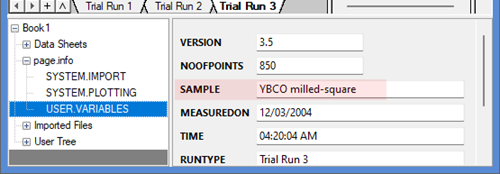
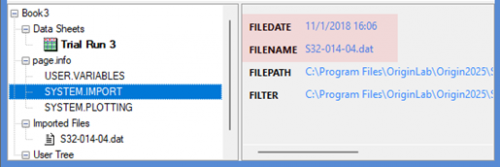
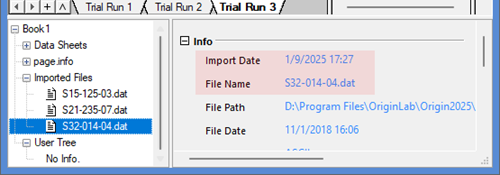
| @W, UserVar$ | The user variables extracted during import wizard workbooks. UserVar is the name of the user variable |
|
| @W, NodeName$, [format] | Returns the information in NodeName under page.info or User Tree in the Workbook Organizer. |
|
| @WFn, NodeName$, [format] | Returns the information in vNodeName under the nth Imported Files in the Workbook Organizer. |
|
| @WS, NodeName$, [format] | Returns the information in NodeName of the nth sheet under Data Sheets in the Workbook Organizer. No need to specify Column. |
|
| @WC, NodeName$, [format] | Returns the information in NodeName of User Tree at the column level, which can be seen in the Column Properties dialog. |
|
Plot Information
| @ Option | Substitute Text From.. | Example |
|---|---|---|
| @F | Plot's statistics such as mean, max, min, total, count, ... | %(1,@F"mean(this)") --> 120.45643 %(1,@F"mean(this)", .2) --> 120.46
|
| @GF | Graph's filter condition.
Support %(L for page title, i.e %(L[n],@GF) where L for current layer and L2 for layer2 |
%(1,@GF) --> > 1996 |
| @GFN | Graph's filter condition with column name. | %(1,@GFN) --> Year > 1996 |
| @GG | Group Name of current plot in a graph | %(2, @GG)
|
| @GL | Layer Name of current plot in a graph | %(2, @GL)
|
| @L[n] | The information of current plot: @L1: Plot Index |
%(1,@L1) --> 1 %(1,@L2) --> g1 |
| @LX | Plot Designation Index. When you have columns A(X1), B(Y1), C(X2) and D(Y2), plot then into a graph, you can use @LX to get the desinagtion index and show 1, 2 in the legend text. |
%(1,@LX) --> 1 |
| @V"above"/@V"below" | Use in Fill Area Under Curve graph only. When Fill to next data plot - Above Below Color is selected, this notation is used for labels to indicate the filled-color above / below base curve. | %(1, @V"above")
%(1, @V"below")
--> |
Dataset/Range Information
| @ Option | Substitute Text From.. | Example |
|---|---|---|
| @D | Dataset name | %(?Y,@D) --> Book1_B |
| @R | Dataset range | %(1,@R) -->
[Book1]"Trial Run 2"!Col("Delta Temperature")[1:32] |
| @R1 | Dataset range without row index | %(1,@R1) -->
[Book1]"Trial Run 2"!Col("Delta Temperature") |
| @RB | Starting row index of the plotted data | %(1,@RB) -->
1 |
| @RE | Ending row index of the plotted data, same as @RN if @RB is 1 | %(1,@RE) -->
32 |
| @RN | Total number of rows in the plotted data (will not exclude missing values or masked data points) | %(1,@RN) --> 32 |
Holder Book Information
| @ Option | Substitute Text From.. | Example |
|---|---|---|
| @PLE | Holder Book Long Name. Returns the Long Name of container workbook for embedded Graph, Matrix, Notes or HTML Report. | %(%H,@PLE) |
| @SC | Holder Sheet Comment. Returns the Comment of sheet for an embedded Graph, Matrix, Notes or HTML Report. | %(%H,@SC) |
| @SN | Holder Sheet Display Name; if Label exists use Label. Returns the Display Name or Label of sheet for an embedded Graph, Matrix, Notes or HTML Report. | %(%H,@SN) |
| @SNL | Holder Sheet Label. Returns the Label of sheet for an embedded Graph, Matrix, Notes or HTML Report. | %(%H,@SNL) |
| @SNS | Holder Sheet Name. Returns the Name of sheet for an embedded Graph, Matrix, Notes or HTML Report. | %(%H,@SNS) |
Note: When units are displayed in the substituted texts, the English and Japanese versions of Origin enclose the units in parentheses ( ), while the German version will use square-brackets [ ].
Examples
Show Statistics info. of Plot as Tick Labels
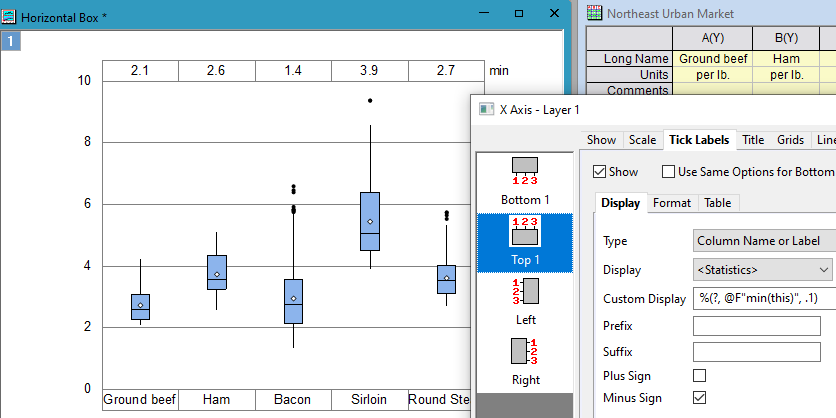
For Box chart, show minimum value with one decimal places for each plot as tick labels on top axis by %(?, @F"min(this)", .1).
Preset graph name in the template
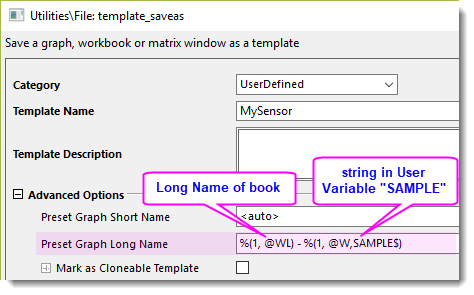
Suppose we have many workbooks with same structure as below. We want to batch-plot these books from an existed graph and preset the graph Long Name as <workbook long name> - <Sample> for distinguishing. We can preset the graph name by %() notation when saving the template.
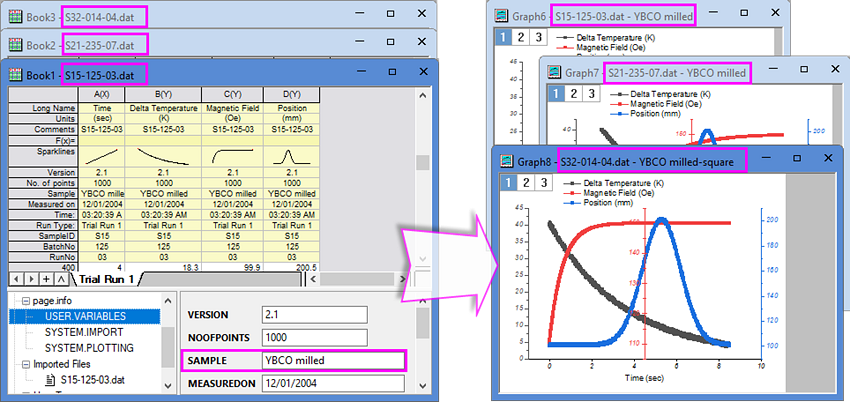
- After customization, right click on the graph window title to open the Save Template as dialog. Enter
%(1, @WL) - %(1, @W,SAMPLE$)
in the Preset Graph Long Name box. - When create graphs from the saved template, graphs Long Name will be constructed by workbook Long Name – string in user-defined parameter row "Sample".
Export worksheet as PDF with Book and sheet name in File name
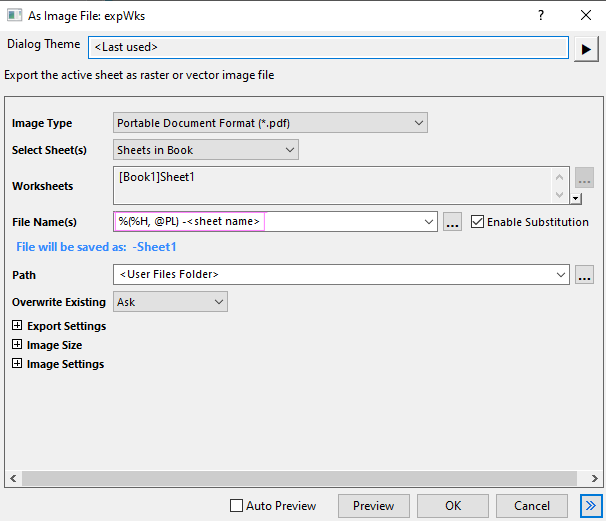
When using File: Export: As PDF File to export multiple sheets in a book with File Name(s) set to <long name>, PDF files names will be in [<book long name>]<sheet>.PDF format. Set File Name(s) to %(%H, @PL) - <sheet name>. The exported PDF file names will be in <book long name> - sheet name.pdf format.
Export embedded graph with Book and sheet name in File name
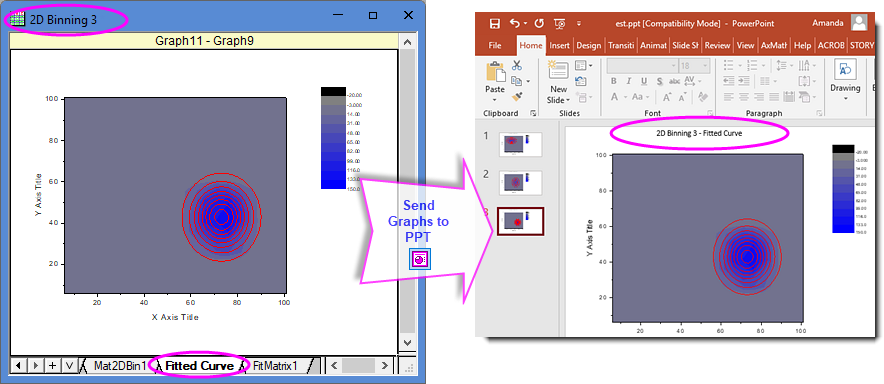
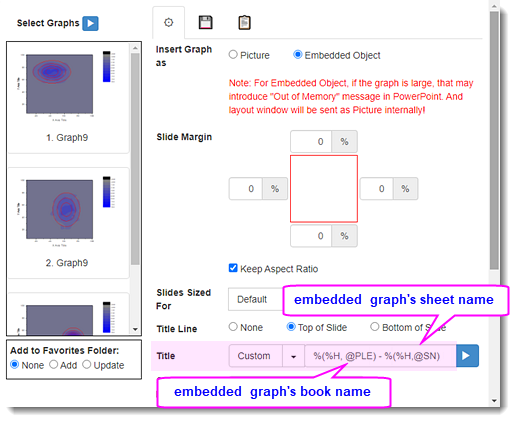
Suppose we collect all analysis related data and graphs in one workbook as below. We want to export the embedded graph to PowerPoint and attach the workbook and worksheet name as title line. We can preset it in the Send Graph to PowerPoint dialog.
- Click the Send Graphs to PowerPoint button on the Standard toolbar. In the open dialog, choose Custom for Title and enter
%(%H, @PLE) - %(%H,@SN)
in the text box. - The graphs sent to PPT should have title line such as "2D Binning 3 - Fitted Curve" on the top.
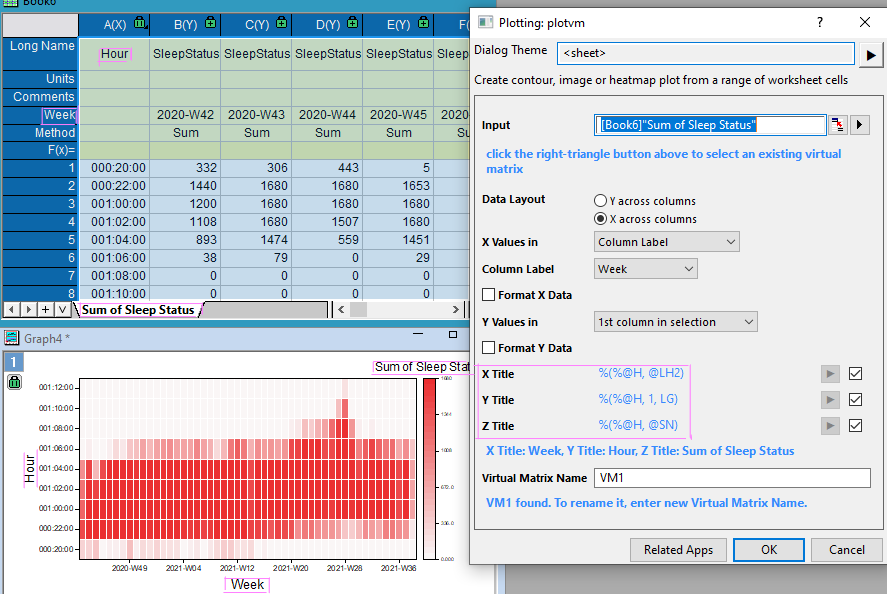
Preset X, Y, Z axis title when plotting Heatmap
When using data in worksheet as virtual matrix to plot heatmap or contour graph, X Title, Y Title and Z Title (used for color scale title) can be set based on X, Y info and worksheet name.
Annotate on Graph
When we use Annotation tool to label a data point, the auto-generated labels show XY coordinates by default. To add more information, e.g., worksheet name to the label, we can use
%(?, @WS)
to refer to it.