2.112 FAQ-1034 How to not use Data Connector when drag and drop data into Origin?
Not-Use-Data-Connector-When-Drag-n-Drop
Last Update: 6/3/2021
Data Connectors are Origin's newest data import technology, offering easy drag-and-drop import of common file types. That is, when you drag and drop to import a file type that can be imported by both Data Connector and old import method (import X-Functions), connector will be used by default.
To disable Data Connector when drag and drop:
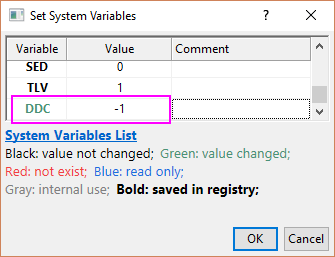
- Select menu Preferences: System Variables.
- Set the value of system variable @DDC to -1 to prevent connector from using for all file types.
Please refer to system variables page to modify @DDC to other value to exclude specific file types from using a Data Connector.
Beside, there are several EXCEPTIONS you should pay attention to:
- When drag and drop a data file into a worksheet with data import settings saved, it will always use the old import method. This may be the case if you created the analysis template in some old version like Origin2019 and then reuse it in newer version like Origin2020b.
- When a proper user-defined Origin Import Filter (*.oif) file exists in: (a) the same folder where your data file is, or, (b) User Files\Filters folder,
dragging and dropping the file into Origin will use the old import method. This may be the case if you have an older Origin import routine that performs satisfactorily and you decide to stick with it.
 |
- To use a user-defined import filter when drag-and-drop, the Support Drag&Drop box for the filter must be checked in Filter Manager (Preferences: Import Filters Manager).
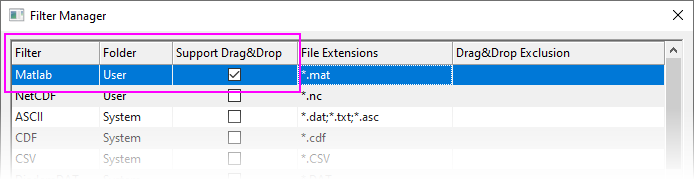
- Modify the value of system variable @IFS to controls whether to show the relative System filter in the Select Filter dialog to let you select when drag-and-drop a specific file type.
|
- If you have any legacy import code in DOFILE.OGS, a file in your Program (SYSTEM) or User Files (USER) folder, the code still runs satisfactorily. You do not need to write new import routines.
| Note:
We recommend use of Data Connectors, when possible, as Connector technology is currently undergoing development, while older Origin import method is not. For instance, Text/CSV files containing date-time data are automatically handled and formatted as date-time in the worksheet.
|
Keywords:import, ASCII, CSV, TXT, DAT, Excel, Connector, D&D, data filter