Last Update: 2/20/2022
When you import large number of files(by using Data: Import From File), you may find Origin becomes slower and slower along with more and more data is imported. It may often happen when you use LabTalk or OriginC scripts to import a large number of data files. It is probably caused by
You can try the following solutions to speed up the system.
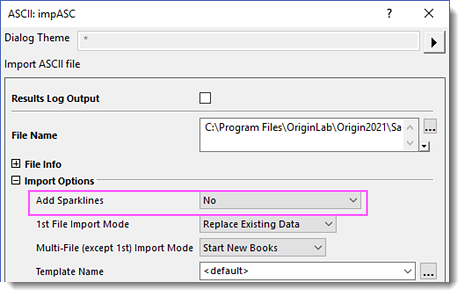
If you are running LabTalk scripts,
Add the following option to the import code:
options.Sparklines:=0
If you already import data files with sparkline enable
Run the following scripts to delete all sparkline graphs, and then resave project.
StringArray sa;

doc -e P
{
	if (%H == "sparkline*")
		sa.Add(%H);
}

int nn = sa.GetSize();
for (int ii=1; ii<=nn; ii++)
{
	win -c %(sa.GetAt(ii)$);
}
Or,
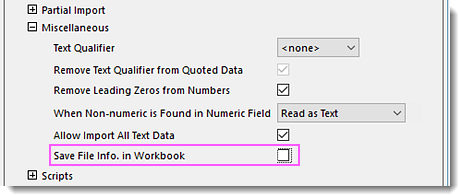
If you are running LabTalk code,
Add the following option to the import code:
options.Miscs.SaveFileInfo:=0
Note: Without saving the import information, you cannot use Data: Re-Import menu to reimport the data. Please keep this in mind when you turn off "Save File Info in Workbook".
Set the system variable @UN to 0 before importing and restore it afterwards.
If you are running Origin C code,
Use similar functioni to this examplen:
void DoImport()
{
    // This class sets a system variable to a new value
    // while storing the old value.
    // When the instance of the class goes out of scope,
    // the instance is destroyed and the system variable
    // restored to it's previous value.

   LTVarTempChange junk("@UN", 0);

   // Perform all importing in same scope as above class instance until done.
}
If you are running LabTalk code:
// Save current value of @UN.
int nOld = @UN;

// Turn off Undo.
@UN = 0;

// Perform all importing until done.

// Finally restore previous value of @UN.
@UN = nOld;
Keywords:impasc, slow, import file, freeze, take long time, data import, import ASCII, project, slowness, OPJ, save, open, sparkline,LT, OC, import,multiple, many,files, loop, speed, memory, import, re-import