Last Update: 7/11/2022
If you have a large dataset in a project file (many workbooks or a worksheet contains many columns/rows), and those dataset columns contain sparklines (displayed or hidden), any worksheet-based operation can lead to slow performance or in extreme cases, unresponsiveness.
You can try the following to speed up the system.
Beginning with Origin 2022b, you have two easy options for removing sparklines:
del -spk
Users of older versions of Origin can use one of the following solutions.
Run the following scripts to delete all sparkline graphs in the project.
StringArray sa;

doc -e P
{
	if (%H == "sparkline*")
		sa.Add(%H);
}

int nn = sa.GetSize();
for (int ii=1; ii<=nn; ii++)
{
	win -c %(sa.GetAt(ii)$);
}
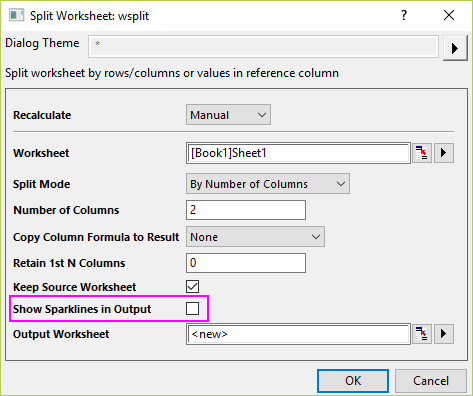
If the manipulation/analysis tool you use on current worksheet/workbook will create a large number of new worksheet/workbook, e.g. Split Worksheet tool, the system speed will become slow since the Sparkline is turned on by default.
To speed up, please turn off Sparklines in the operation dialog.
Keywords:slow, freeze, take long time, split sheet, project, slowness, OPJ, wsplit, sparkline, LT, split workbook, many, files, speed, memory, import