 See more related video:Fitting Multiple Quick Peak Analysis OriginPro
See more related video:Fitting Multiple Quick Peak Analysis OriginPro
This page is for OriginPro only. It is available in the Peak Analyzer only when Fit Peaks is selected for Goal in the Start page. It performs fitting to the peaks that are found by the Find Peaks page.

| Dialog Theme | See Peak Analyzer Themes. |
|---|
| Snap to Spectrum | Select this checkbox to specify whether you want the peak center anchor points to be snapped to the spectrum data. If this is selected, the peak center anchor points will be pulled onto the spectrum as you add or move them. |
|---|---|
| Peaks | Click the Add button to add peaks manually. Or, click the Modify/Del button to modify or delete peaks manually. |
| Show Residuals | Specifies whether to show the current residuals plot. |
| Show 2nd Derivative | Specifies whether to show the second derivative of the spectrum data. |
| Generate Report from Current Fitting Result | If this check box is selected, the results report will be generated after you click the Finish button even when the fitting does not converge. Otherwise, the results report will be generated only when the fitting converges. |
| Fit Control | Click this button open the Peak Fit Parameters dialog, which allows you to control the fitting. See more details here. |
| Fit | Click this button to perform the fit. |
| Method | Specifies the weighting method, which will be used in the calculating the Chi-Square during the fitting. The available weighting methods are:
See details in Fitting with Errors and Weighting |
|---|---|
| Data | This is available when Method is Instrumental, Arbitrary Dataset or Direct Weighting. Use this to specify the dataset that will be used for weighting. |
| Dataset Identifier | Specify the identifier for the source datasets.
|
|---|---|
| Report Tables/ Peaks Table/ Fitted Curves | Specifies the destination of Report Tables/ Peaks Table/ Fitted Curves. Report Tables store comprehensive results for peak fitting. Peaks Table store peaks information. Fitted Curves store the data for baseline and fitted curves.
|
| Fit Residuals | Specifies the destination workbook and worksheet for residual values
|
| Subtracted Data | This is available only when a baseline has been subtracted and the Add Back Baseline check box is disabled. Specifies the destination workbook and worksheet for subtracted data.
|
| Baseline Data | This is available only when a baseline has been subtracted and the Add Back Baseline check box is enabled. Specifies the destination workbook and worksheet for baseline data.
|
| Quantities to Compute | Specifies the quantities to be computed and displayed in the fitting report.
Please see details on the computation here. |
|---|---|
| Peaks Properties | Specifies the peak characteristics to be computed and displayed in the peak worksheet report.
|
| Create Summary Graph | Specifies whether to create report graph.
|
|---|---|
| Result Table | It is available only when Create Summary Graph was selected to New Graph or Source Graph. Use this drop-down list to specify whether to show the result table on the report/summary graph.
|
| Fitted Curves Plot | When this checkbox is selected, fitted curves will be outputted and the controls under this branch will become available. Otherwise, the fitted curves will not be outputted and other controls will be unavailable.
|
| Residual vs. Independent Plot | Specifies whether to output the Residual vs. Independent plot. |
| Peak Report Fields | This Peak Report Fields group includes a display box and a toolbar with five buttons  : :
|
Only available when Show Result Table on Graph is checked under Result: Configure Graph node. This Quantities in Table dialog includes a display box and a toolbar with five buttons :
| Display Box | The selected quantities and added comments will display in this box. |
|---|---|
Triangle Button for Select 
|
Click this button then choose a quantity or add comments from fly-out menu:
|
Remove button 
|
Remove the selected quantities from the Display Box. This button is available when you select one or more selected quantities in the box. |
Move Up button 
|
Move the selected quantities up in the Display Box. Use this button to order the quantities and the results table will follow this order. |
Move Down button 
|
Move the selected quantities down in the Display Box. Use this button to order the quantities and the results table will follow this order. |
Select All button 
|
Select all data quantities down in the Display Box. When clicked, this button becomes Unselect All button  . .
|

 to
to  . (In the report worksheet, this column is named Area Fit.)
 ). See 3rd Order Moment below. (In the report worksheet, this column is named Center Grvty.)
 ). See 3rd Order Moment below (In the report worksheet, this column is named Variance).
 is the 3rd order moment and
 is the 4th order moment and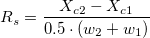
 and
and  are peak centers, and
  and
and  are constructed base widths.
 (0th moment or the area of the peak)
 , where
  (nth zero-point moment)
 , where
  ((nth central moment)
 (0th moment or the area of the peak)
 , where
  , where