2.2.1.12 XYZ2Mat
Contents
Menu Information
Worksheet: Convert to Matrix: XYZ Gridding
Brief Information
Convert XYZ data to matrix
Command Line Usage
1. XYZ2Mat iz:=(col(a),col(b),col(c)) settings.ConvertToMatrix:=1 om:=<new: Sparse>;
2. XYZ2Mat -r 2 iz:=[Book1]Sheet1!((A"x position",B"y position",C:F)) settings.ConvertToMatrix:=2;
X-Function Execution Options
Please refer to the page for additional option switches when accessing the x-function from script
Variables
| Display Name |
Variable Name |
I/O and Type |
Default Value |
Description |
|---|---|---|---|---|
| Input | iz |
Input XYZRange |
|
XYZ worksheet data which needs to convert into matrix by gridding. If multiple Z columns are specified, each Z column will be converted to a matrix object of the same matrix sheet. |
| Gridding Settings | settings |
Input TreeNode |
|
Settings for gridding XYZ worksheet data. Please refer to More Information section below for more details. |
| Output Matrix | om |
Output MatrixLayer |
|
If this check-box is selected, it allows specifying a matrix for the output gridding data. Output Matrix and Output Virtual Matrix can only one be selected.
See the syntax of Output Notations. |
| Output Virtual Matrix | ovm |
Output Worksheet |
|
If this check-box is selected, it allows specifying a worksheet for the output gridding data. And the output worksheet is arranged as a virtual matrix. Output Matrix and Output Virtual Matrix can only one be selected. And if input range contains multiple sets of Z columns, virtual matrix is not supported.
See the syntax of Output Notations. |
Examples
- Create a new workbook and import the data <Origin Installation Directory>\Samples\Matrix Conversion and Gridding\XYZ Random Gaussian.dat into this workbook.
- Highlight column C and select Set As: Z from the right-click menu to set column C as Z column.
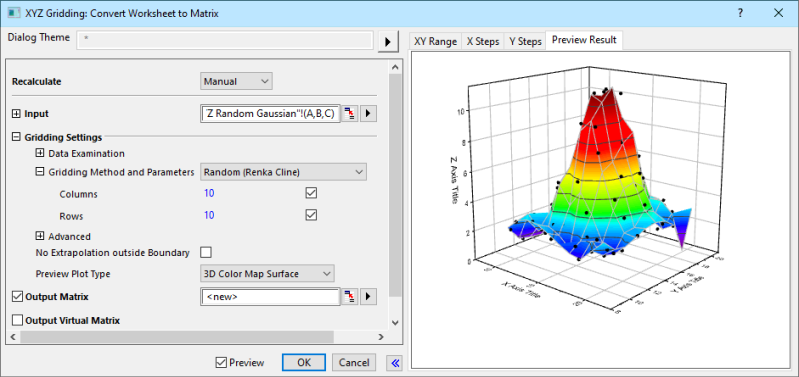
- Keep column C highlighted and select main menu Worksheet: Convert to Matrix: XYZ Gridding or run
XYZ2Mat -d;in the Command Window to open the XYZ Gridding dialog. - Expand the Gridding Settings branch, choose Random (Renka Cline) from the Gridding Method and Parameters drop-down list, and 3D Color Map Surface from the Preview Plot Type drop-down list. Check the Preview check-box to the left of the OK button. In the Preview panel, select the Preview Result tab to show the result in 3D color map surface graph.
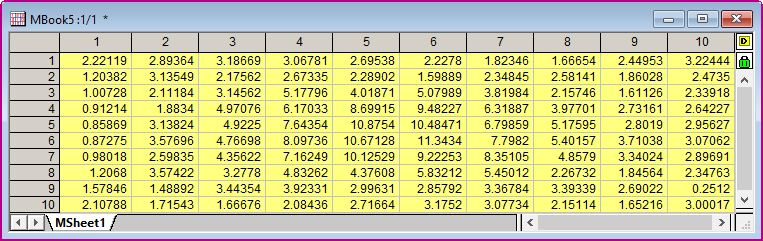
- Click the OK button to get the result as below.
Description
This X-Function convert XYZ worksheet data into matrix by XYZ Gridding. For more information, please refer to our User Guide: Description of XYZ Gridding Methods.
More Information
settings (Gridding Settings)
The settings (Gridding Settings) tree specifies the XYZ gridding settings.
Syntax: settings.Treenode:=<value>
Example: settings.ConvertToMatrix:=2
| Treenode | Type | Default | Description | |
|---|---|---|---|---|
| ExamData (Data Examination) |
XStepTol (Tolerance for Even X Step) | doule | 1E-8 | ExamData (Data Examination) |
| YStepTol (Tolerancce for Even Y Step) | double | 1E-8 | ||
| XPrecision (Tolerance for Duplicate X) | double | 1E-8 | ||
| YPrecision (Tolerance for Duplicate Y) | double | 1E-8 | ||
| RemoveDuplicate (Replace Duplicate With) | int | 0 | ||
| ConvertToMatrix (Gridding Method and Parameters) |
columns (Columns) | int | 20 | Gridding Method and Parameters |
| rows (Rows) | int | 20 | ||
| QILF (Quadratic Interpolant Locality Factor) | double | 18 | ||
| WFLF (Weight Function Locality Factor) | double | 9 | ||
| searchradiu (Search Radius) | doule | 2 | ||
| averadius | double | 2 | ||
| minipoints (Minimum Points) | double | 10 | ||
| maxipoints (Maximum Points) | double | 100 | ||
| CorrelationSmoothing (Smoothing) | int | 1 | ||
| TPSSmoothing (Smoothing) | int | 0 | ||
| extrapolation (Extrapolation) | int | 0 | ||
| outsizevalue (Outside Value) | int | 0 | ||
| tolerance (Tolerance) | double | 0.005 | ||
| advanced (Advanced) |
SelectRange (Range Restriction) | treenode | Advanced
| |
| noextrapolation (No Extrapolation outside Boundary) |
int | 0 | No Extrapolation outside Boundary | |
| previewplottype (Preview Plot Type) |
int | 1 | Preview Plot Type |
Algorithm
- Gridding of Regularly Spaced Data
- Gridding of Sparse or Missing Data
- Gridding Methods for Randomly Spaced Data
References
Related X-Functions
w2m, m2w, r2m, wexpand2m, xyz_regular, xyz_sparse, xyz_shep, xyz_shep_nag, xyz_renka, xyz_renka_nag, xyz_tps
Keywords:worksheet, gridding