2.2.3.41 wcolor
Contents
Menu Information
Worksheet: Conditional Formatting: Highlight
Brief Information
Apply conditional formatting to worksheet cells using custom rules.
Command Line Usage
1. wcolor rng:=[Book1]Sheet1! name:="C1R1-C0R0" trrule.cond1:=4 trrule.val11:=30;
2. wcolor rng:=[Book1]Sheet1! name:="C1R1-C0R0" trrule.cond1:=1 trrule.val11:=10 trrule.join:=1 trrule.cond2:=3 trrule.val21:=5 trrule.fill:=18 trrule.font:=4;
X-Function Execution Options
Please refer to this page for additional option switches when accessing the x-function from script.
Variables
| Display Name |
Variable Name |
I/O and Type |
Default Value |
Description |
|---|---|---|---|---|
| Range | rng |
Input Range |
<active> | Specify range of the cells in the worksheet to apply conditional formatting. Note: if you want to applly the conditional formatting according to a set of text values, please set this column as categorical first (right click on this column and select Set as Categorical). |
| Name | name |
Input string |
Specify the name for the selected range. | |
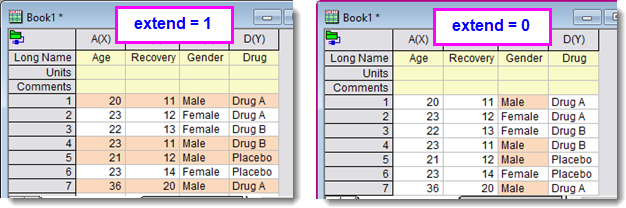
| Apply Coloring to Sheet | extend |
Input int |
0 | Specify whether to color the whole sheet range by the specifed condition. If selected, the applied color will extend from the input range to the whole row.
|
| Rule | trrule |
Input TreeNode |
<unassigned> | Set the condition and color options. See more details in this page. |
Description
Use this X-Function to color cells that the value matchs the condition setting
Examples
Example 1: To color the cells containing the specified text.
- Create a new workbook and import the file automobile2.dat in the <Origin Program Folder>\Samples\Statistics folder.
- Type the following script in the Script Window and press Enter key.
wcolor rng:=[automobile2]automobile2!3 name:="C3R1-C3R0" trrule.cond1:=7 trrule.text1:=Japan;
Then the cells with text Japan will be colored in the third column.
Example 2: To color the rows containing male info.
- Create a new workbook and select Data: Connect to File: Text/CSV to import the file <Origin Program Folder>\Samples\Graphing\Categorical Data.dat with default settings.
- Select Worksheet: Conditional Formatting: Highlight to open wcolor dialog. Specify options like image below. Click OK.
Or,
Type the following script in the Script Window and press Enter key.wcolor rng:=[Book1]"Categorical Data"!C"Gender" name:="C3R1-C3R0" extend:=1 trrule.cond1:=8 trrule.custom1:="x == "Male"" trrule.fill:=29219323 trrule.font:=-9;
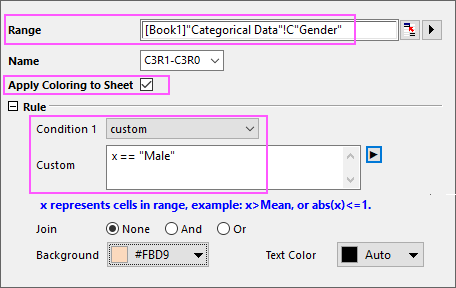
Then rows containing male information will be highlight with specified background color.
Related X-Functions
Keywords:cell coloring