2.8.32 vmathtool
Contents
Menu Information
Analysis: Mathematics: Simple Column Math
Brief Information
Perform simple arithmetic on a single column.
Command Line Usage
- vmathtool ix1:=col(1) operator:=add operand:=data ix2:=col(2) ox:=<new>;
- vmathtool ix1:=col(3) operator:=sub operand:=constant constant:=100;
- vmathtool ix1:=col(1) operator:=custom ix2:=col(2) formula:=x1*100+x2^2 ox:=<new>;
X-Function Execution Options
Please refer to the page for additional option switches when accessing the x-function from script
Variables
| Display Name |
Variable Name |
I/O and Type |
Default Value |
Description |
|---|---|---|---|---|
| Input1 | ix1 |
Input vector |
|
Specifies input data range. The input data range can be a single column or a part of a column. |
| Operator | operator |
Input int |
|
Specifies the Operator.
|
| Operand | operand |
Input int |
|
Specifies the operand type.
|
| Reference Data | ix2 |
Input vector |
|
Specifies a data range (a single column or a part of a column) as operand. This option is available when Reference Data is selected from Operand drop-down list. |
| Constant | constant |
Input double |
|
Specifies a constant as operand. This option is available when Constant is selected from Operand drop-down list. |
| Formula | formula |
Input string |
|
Specifies the formula to calculate, in which x1 means Input1 and x2 means Reference data. This option is available when Custom is selected from Operator drop-down list. |
| Output | ox |
Output vector |
|
Specifies the output data range |
| X Minimum | xmin |
Output double |
|
Minimum X value of output data range |
| X Maximum | xmax |
Output double |
|
Maximum X value of output data range |
| X Mean | xmean |
Output double |
|
Mean X value of output data range |
Description
This tool performs simple arithmetic on a (part of) single column, or between two columns. You can add a constant on a set of data, or subtract a set of data by another one.
Examples
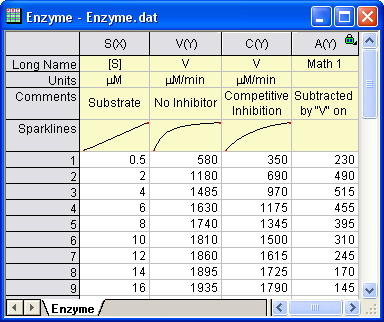
The following steps show you how to subtract a column by another.
- Click Import Single ASCII button
 on the standard toolbar to open the ASCII dialog. Select Enzyme.dat from <Origin Program Directory>\Samples\Curve Fitting folder and check Show Options Dialog checkbox. Click Open button.
 - In the impASC dialog open, expand Header Lines sub branch under the Import Options branch. Set Number of Subheader Lines to 3, Long Names to 1, Units to 2, both Comments From and Comments To to 3. Click OK button to import Enzyme.dat.
- With "Enzyme" worksheet active, click Analysis: Mathematics: Simple Column Math to open vmathtool dialog.
- Click the triangle to the right of Input1 and select V(Y):V from the context menu. Select Subtract from Operator drop-down list and Reference Data from Operand drop-down list. Click the interactive button
 next to Reference Data, and select column C in the source worksheet as Operand. Select <new> for Output. And then click OK button.
A new column is added to the original worksheet. It shows the difference between "No Inhibitor" condition and "Competitive Inhibition" condition. The result worksheet should be as follow:
Related X-Functions
Keywords:calculation