2.14.2.30 pep_addshortcuts
Contents
Menu Information
Right on the file(s) in the Project Explorer: Add Shortcut to Favorites
Brief Information
Create shortcuts for selected windows in Favorites folder
Additional Information
X-Function not designed for Auto GetN Dialog.
Minimum Origin Version Required: 8.1 SR0
Command Line Usage
pep_addshortcuts dump:=1;
X-Function Execution Options
Please refer to the page for additional option switches when accessing the x-function from script
Variables
| Display Name |
Variable Name |
I/O and Type |
Default Value |
Description |
|---|---|---|---|---|
| dump |
Input int |
|
Specify whether to dump how many shortcuts have been added to Favorites. |
Description
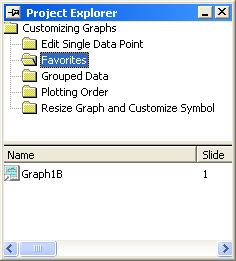
This X-Function is used to create shortcuts for selected windows in the Favorites folder. If the Favorites folder does not existing, after executing this X-Function, Origin will create a folder named Favorites automatically.
Examples
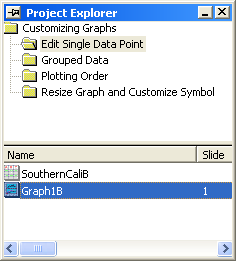
This example is use to add a shortcut for the graph to Favorites.
- Open the project <Origin Program Directory>\Samples\Graphing\Customizing Graphs.opj.
- In the Project Explorer, click the folder Edit Single Data Point, and then select Graph1B.
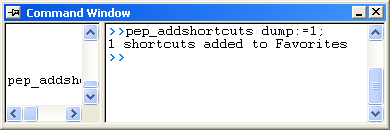
- Run script
pep_addshortcuts dump:=1;in the Command Window, then Origin dump 1 shortcuts added to Favorites in the Command Window