2.7.44 impJCAMP
Contents
Menu Information
Data: Import from File: JCAMP-DX (DX, DX1,JDX, JCM)
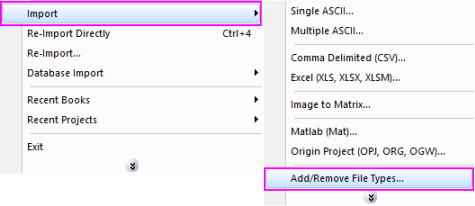
If you do not see this file type, choose Data: Import from File: Add/Remove File Types...
 | To add drag & drop support for a file type, see Import Filter Manager. |
Brief Information
Import JCAMP-DX Version 6 files
Command Line Usage
1. impJCAMP fname:="c:\test.dx";
2. impJCAMP trifles:="*.dx";
X-Function Execution Options
Please refer to the page for additional option switches when accessing the x-function from script
Variables
| Display Name |
Variable Name |
I/O and Type |
Default Value |
Description |
|---|---|---|---|---|
| File Name | fname |
Input string |
|
Filename of the file to be imported. Click the browse button beside the list box to open one or more files and the filenames will be listed in the box. |
| File Info | trFiles |
Input TreeNode |
|
This is used in the dialog for displaying the basic information of the file. Please see the Description part of this document for details.
|
| Import Options | options |
Input TreeNode |
|
This is used for specifying the import filter. Please see the Description part of this document for details.
|
| Output | orng |
Output Range |
|
This is used to specify the output range. See the syntax here. |
| Header Info | finfo |
Output TreeNode |
|
This is for outputting the header information. It is hidden from the GUI. Users are not advised to use this variable.
|
Description
This X-Function is used for importing JCAMP-DX (.DX, .DX1, .JDX, .JCM) Version 6 files.
Details on Some Dialog Options
- Import Options(options)
- Please see this page for more details.
Examples
1. The following example imports a JCAMP-DX data:
- a. From the Origin menu, select Data: Import from File: JCAMP-DX (DX, DX1, JDX, JCM). This opens the Import JCAMP-DX File dialog for you to choose the import file.
- b. Browse to the folder where your data file is. Select the file and click the Add File(s) button. Click OK to close the dialog box.
- c. In the impJCAMP dialog box, click Ok to close the dialog.
2. The following script command imports a JCAMP-DX file (c:\test.dx) without opening the dialog:
fname$="c:\test.dx";
impJCAMP;