2.6.4.9 imgRGBsplit(Pro)
Contents
Menu Information
Image: Conversion: RGB Split
Brief Information
Split color image into RGB channels
Additional Information
This feature is for OriginPro only.
Command Line Usage
1. imgRGBsplit img:=[Mbook1]Msheet1!Mat(1);
2. imgRGBsplit img:=mat(1) r:=mat(2) g:=mat(3) b:=mat(4) colorize:=1;
X-Function Execution Options
Please refer to the page for additional option switches when accessing the x-function from script
Variables
| Display Name |
Variable Name |
I/O and Type |
Default Value |
Description |
|---|---|---|---|---|
| Input Matrix | img |
Input Image |
|
Specifies the source image to manipulate. The default input is the active image. |
| Red Image | r |
Output Image |
|
Specifies the output image for the red channel. By default, an image named red will be used. See the syntax here. |
| Green Image | g |
Output Image |
|
Specifies the output image for the green channel. By default, an image named green will be used. See the syntax here. |
| Blue Image | b |
Output Image |
|
Specifies the output image for the blue channel. By default, an image named blue will be used. See the syntax here. |
| Colorize | colorize |
Input int |
|
Specifies whether to colorize the output images. If it is set to 1, the output images will be colorized, using palettes. |
Description
|
Color channels refer to certain components of a color image. There are several kinds of channel models, such as RGB, CMYK, and HSV. Among them, RGB is the most widely used model, in which any pixel of a color image is represented by its red, green, and blue components. This is also the model used in Origin. Sometimes, the information we are interested in resides on a single color channel only. In this case, we can consider splitting the color channels from the original image and process the color channels separately. For example, if a user wants to extract an object whose color is mainly green from its background, they can break the input image into its RGB channels and then operate on the green channel. After processing the color channels, you can opt to recombine them to get a new, processed color image. OriginPro provides two tools for manipulation color channels: RGB Split and RGB Merge. The RGB Split tool, imgRGBsplit function can split the input color image into red, green and blue channels, allowing you analyze or process the color channels separately. It also provides the Colorize option to apply pseudocolor to the channel images. On the other hand, the RGB Merge tool recombines the Red, Green and Blue channels to form a color image. |
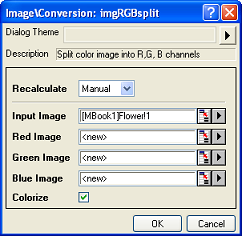
|
Examples
In this example, we use the imgRGBsplit function to split the R, G, B channels of the input image:
- When the input image is active, select Image: Conversion: RGB Split. This opens the dialog of the X-Function.
- In the X-Function dialog, change the settings as the screenshot below and click OK to close the dialog.
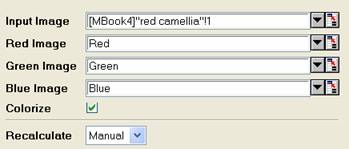
Three new images are created. They are the channel images for the input image.
Input Image

Output Image


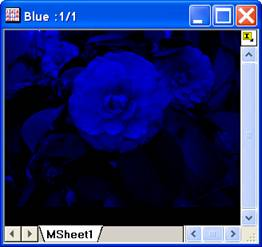
Red Channel Image
Green Channel Image
Blue Channel Image
Note: OriginPro includes the ability to automatically recalculate the analysis results of the RGB Split and RGB Merge operations any time you change the parameters or update your source data. In addition, the settings for the analysis routine can be saved to an analysis theme for use later with similar data.
Algorithm
In Origin, each pixel of a color image is represented by its R, G, B component. For splitting the color channels, we only need to separate the components for each channel.
If you choose to colorize the channel images, palettes will be used to apply pseudocolor to the channel images.