2.6.3.3 imgMathfun(Pro)
Contents
Menu Information
Image: Arithmetic Transform: Math Function
Brief Information
Perform math on image pixel values
Additional Information
This feature is for OriginPro only.
Command Line Usage
1. imgMathfun mf:=sqrt fact:=1.5;
2. imgMathfun mf:=sin fact:=2 oimg:=mat(2);
3. imgMathfun oimg:=<new>;
X-Function Execution Options
Please refer to the page for additional option switches when accessing the x-function from script
Variables
| Display Name |
Variable Name |
I/O and Type |
Default Value |
Description |
|---|---|---|---|---|
| Input Matrix | img |
Input Image |
|
Specifies the input image. The default input is the active image. |
| Function | mf |
Input int |
|
Specifies the math function to apply.
|
| Factor | fact |
Input double |
|
Specifies the factor. For Square, Log and Square Root operators, the output image will be multiplied by the factor after the math function applied, i.e., oimg = fact*Func(img); For sine and cosine operators, the factor is multiplied before math function applied, i.e., oimg = Func(fact*img). |
| Output Image | oimg |
Output Image |
|
Specifies the output image. By default, the output image is the same as the input image. See the syntax here. |
Description
|
This function lets you apply a mathematical function to the pixel values of an image, allowing you to remap them so as to enhance or adjust the image. The model for the Math Function tool in OriginPro is as the following equation shows: \[OutputImage = function(InputImage*factor)\] where the factor and function can be specified by the customer. Available functions include:
For square, log and square root, a factor is multiplied after the mathematical function is applied while for sine and cosine, the pixel value is multiplied firstly before applying mathematical function. |
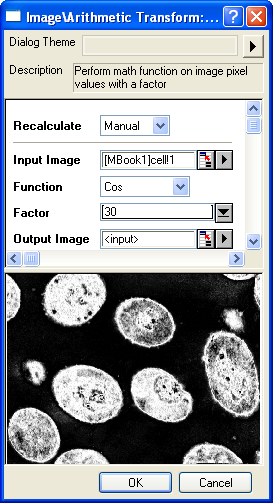 |
Examples
Below is an example where the Math Function tool has been used to apply the Cosine function with a factor of 30.
- When the input image is active, select Image: Arithmetic Transform: Math Function. This opens the dialog of the X-Function.
- In the X-Function dialog, change the settings as the screenshot below and click OK to close the dialog.
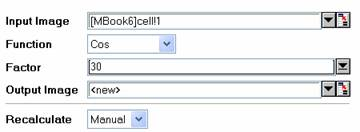
A new image is created as a result.
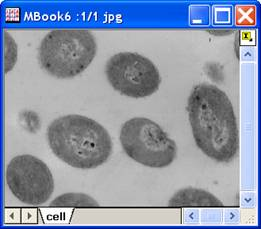
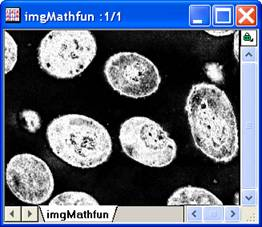
Input image Output image
Note: OriginPro includes the ability to automatically recalculate the analysis result of the Math Function operation any time you change the parameters or update your source data. In addition, the settings for the analysis routine can be saved to an analysis theme for use later with similar data.
Algorithm
The computation mainly uses L_MathFunctionBitmap() function from LEADTOOLS Main API. Please refer to the LEADTOOLS Main API Help file, Version 14 and read the L_MathFunctionBitmap topic.
References
LEADTOOLS Main API Help file, Version 14