2.6.1.10 imgHisteq
Contents
Menu Information
Image: Adjustments: Histequalize
Brief Information
Apply histogram equalization to image
Command Line Usage
imgHisteq cs:=yuv;
imgHisteq cs:=yuv oimg:=mat(2);
X-Function Execution Options
Please refer to the page for additional option switches when accessing the x-function from script
Variables
| Display Name |
Variable Name |
I/O and Type |
Default Value |
Description |
|---|---|---|---|---|
| Color Space | cs |
Input int |
|
Specifies which color space to equalize.
|
| Input Matrix | img |
Input Image |
|
Specifies the source image to be manipulated. The default input is the active image. |
| Output Image | oimg |
Output Image |
|
Specifies the output image. By default, the output image is the same as the input image. See the syntax here. |
Description
This function applies histogram equalization to the input image. We can use it to improve the dynamic range and the contrast of the input image.
Examples
In this example, we use the Histequalize function to boost the contrast of the input image:
- When the input image is active, select Image: Adjustments: HistEqualize: Open Dialog. This opens the dialog of the X-Function.
- In the X-Function dialog, change the settings as the screenshot below and click OK to close the dialog.
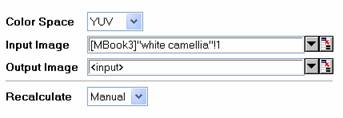
We can see that the input image is modified and the contrast is increased.
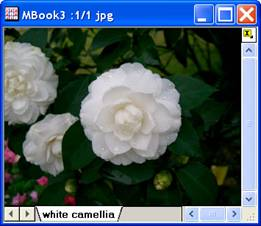
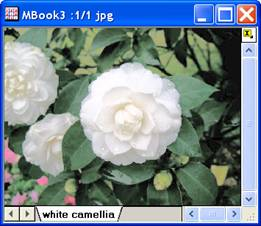
The original image The output image
Algorithm
The computation uses L_HistoEqualizeBitmap() function from LEADTOOLS Main API. Please refer to the LEADTOOLS Main API Help file, Version 14 and read the L_HistoEqualizeBitmap topic.
References
LEADTOOLS Main API Help file, Version 14