2.6.5.2 imgFlip
Contents
Menu Information
Flip
Brief Information
Flip the image horizontally or vertically
Command Line Usage
1. imgFlip d:=horizontal;
2. imgFlip d:=vertical img:=mat(1) oimg:=mat(2);
X-Function Execution Options
Please refer to the page for additional option switches when accessing the x-function from script
Variables
| Display Name |
Variable Name |
I/O and Type |
Default Value |
Description |
|---|---|---|---|---|
| Direction | d |
Input int |
|
Specifies whether to flip the image horizontally or vertically. Option list
|
| Input Matrix | img |
Input Image |
|
Specifies the image to be manipulated. The default input is the active image. |
| Output Image | oimg |
Output Image |
|
Specifies the output image. By default, the output image is the same as the input image. See the syntax here. |
Description
This function flips a specified image either horizontally or vertically.
Examples
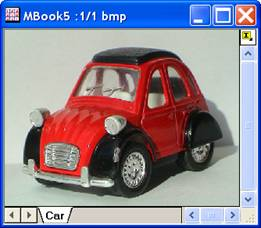
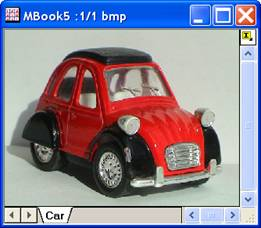
In this example, we use the imgFlip function to flip the input image horizontally:
- Create a new matrix and import car.bmp under \Samples\Image Processing and Analysis folder into it.
- When the input image is active, select Image: Geometric Transform: Flip: Horizontal Flip.
A new image is created. As you can see, the image have been flipped horizontally.
|
|
|
|
|
|
Algorithm
The computation uses L_FlipBitmap() and L_ReverseBitmap() function from LEADTOOLS Main API. Please refer to the LEADTOOLS Main API Help file, Version 14 and read the L_FlipBitmap and L_ReverseBitmap topics.
References
LEADTOOLS Main API Help file, Version 14