2.6.4.2 imgAutoBinary
Contents
Menu Information
Image: Conversion: Auto Binary
Brief Information
Auto convert image to binary
Additional Information
X-Function not designed for Auto GetN Dialog.
Command Line Usage
1. imgAutoBinary img:=mat(1) oimg:=mat(2);
X-Function Execution Options
Please refer to the page for additional option switches when accessing the x-function from script
Variables
| Display Name |
Variable Name |
I/O and Type |
Default Value |
Description |
|---|---|---|---|---|
| Input Matrix | img |
Input Image |
|
Specifies the input image. The default input is the active image. |
| Output Image | oimg |
Output Image |
|
Specifies the output image. By default, the output image is the same as the input image. See the syntax here. |
Description
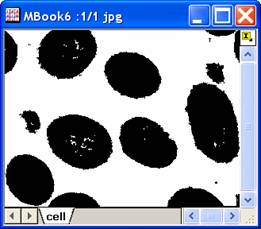
This X-Function converts the input image into a binary image automatically. The threshold used to perform the conversion is calculated based on statistical features of the input image.
This X-Function works best with gray images. If the input image is a color image, each channel of it will be separately binarized.
Note that this X-Function does not have a dialog.
Examples
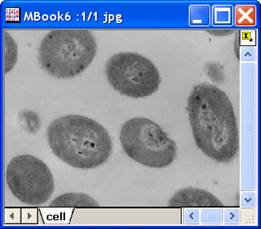
In this example, we use the imgAutoBinary function to convert the input image to a binary image:
- When the input image is active, select Image: Conversion: Auto Binary. This performs the conversion and the input image is modified.
|
|
|
|
|
|
Algorithm
The computation uses L_AutoBinaryBitmap() function from LEADTOOLS Main API. Please refer to the LEADTOOLS Main API Help file, Version 14 and read the L_AutoBinaryBitmap topic.
References
LEADTOOLS Main API Help file, Version 14