2.11.12 envelope(Pro)
Contents
Menu Information
Analysis: Signal Processing: Envelope
Brief Information
Create upper/lower envelope curve for a signal
Additional Information
Minimum Origin Version Required: 8.1 SR0
This feature is for OriginPro only.
Command Line Usage
1. envelope iy:=col(b) type:=2;
2. envelope iy:=col(b) type:=0 npts:=5;
X-Function Execution Options
Please refer to the page for additional option switches when accessing the x-function from script
Variables
| Display Name |
Variable Name |
I/O and Type |
Default Value |
Description |
|---|---|---|---|---|
| Input | iy |
Input XYRange |
|
Specifies the input data range. |
| Envelope Type | type |
Input int |
|
Specifies the type of envelope to be found. Option list:
|
| Smooth Points | npts |
Input int |
|
Smoothing is performed during the envelope detection. This variable controls the smoothing degree. The greater this value is, the smoother the envelope curve will be. See the algorithm page for details. |
| Output | rd |
Output ReportData |
|
Specifies the output range. |
Description
Envelope is a curve “enveloping” the source data. It is tangent to every peak in the source dataset.
This X-Function obtains the upper, lower, or both envelopes of the source data by applying a local maximum method combined with a cubic spline interpolation.
Examples
- The following example detects both upper and lower envelopes in the imported signal data .
- Import the file \Samples\Signal Processing\Sine Signal with High Frequency Noise.dat.
- Highlight the columns in the worksheet and select Plot: Line: Line from the Origin menu to create a line plot.
- Select Analysis: Signal Processing: Envelope from the Origin menu to bring up the dialog of the X-Function.
- Select Both Envelopes from the Envelope type drop-down list. Set Smooth Points to 1.
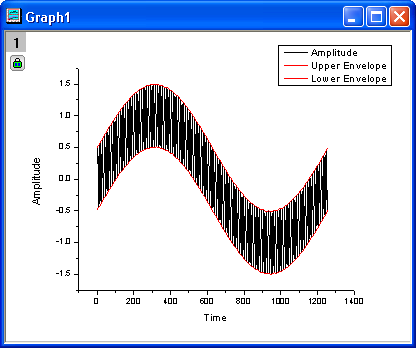
- Check OK to execute. The envelopes should be plotted on the graph. You will get the following result:
- The following scripts perform envelope detection without opening the dialog.
//import the desirable data into a new book.
filename$ = system.path.program$+"Samples\Signal Processing\Gaussian Envelope.dat";
newbook;
impASC filename$;
envelope iy:=col(b) type:=both;//get both upper and lower envelopes to the data
More Information
For more information, please refer to our User Guide.