2.15.10 cvResize
Contents
Menu Information
Image: Resize...
Brief Information
Resize an image.
Additional Information
Minimum Origin Version Required: 2022
Command Line Usage
1. cvresize width:=100;
2. cvresize width:=50 height:=50;
3. cvresize interp:=cubic w:=500 h:=437;
X-Function Execution Options
Please refer to the page for additional option switches when accessing the x-function from script
Variables
| Display Name |
Variable Name |
I/O and Type |
Default Value |
Description |
|---|---|---|---|---|
| Input Image | img |
Input/Output ImageLayer |
|
Select the image to resize. Video is not supported. |
| Keep Aspect Ratio | aspect |
Input int |
|
Check this checkbox to keep aspect ratio of the source image. |
| Width | w |
Input int |
|
Specify the image width after resizing. If Keep Aspect Ratio is selected, Height will be updated accordingly. |
| Height | h |
Input int |
|
Specify the image height after resizing. If Keep Aspect Ratio is selected, Width will be updated accordingly. |
| By a Factor | f |
Input double |
|
Resize the image (both Width and Height) by the specified factor. |
| Interpolation Method | interp |
Input int |
|
Specify the interpolation method used when the image is resized. Option list:
|
Description
This X-Function is used to resize the image to a customized height and width according by specified interpolation method.
Examples
Example 1. Resize the image using Lanczos interpolation method
- When the image is active, select menu Image: Resize....
- In the dialog, change the settings as the screenshot below and click OK to close the dialog.
-
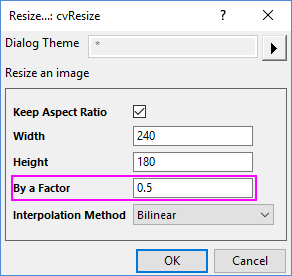
The image is resized down to the half of the original.
Algorithm
The computation uses function from OpenCV Main API. Please refer to the OpenCV Main API Help file, Version 2.4.11.0 and read imgproc. Image Processing topic.
References
OpenCV Main API Help file, Version 2.4.11.0