2.15.7 cvmerge
Contents
Menu Information
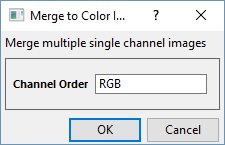
Image: Merge to Color Image
Brief Information
Merge multiple single channel images into a color image.
Additional Information
Minimum Origin Version Required: 2022
Command Line Usage
1. cvMerge order:=BRG;
X-Function Execution Options
Please refer to the page for additional option switches when accessing the x-function from script
Variables
| Display Name |
Variable Name |
I/O and Type |
Default Value |
Description |
|---|---|---|---|---|
| img |
Input/Output ImageLayer |
|
Specify the single chanel images to be merged. The input should be a stack of images with 3 or 4 frames (Red, Green, Blue, Alpha chanels). | |
| Chanel Order | order |
Input String |
|
Specify order in which the chanels are merged. By default, RGB is used. |
Description
This function merges Red, Green, Blue and Alpha channel images into a color image by the specified order. See document for details.
Examples
Example 1.Merge separate channel images into a color image
- When the image is active, select Image: Merge to Color Image.
- In the dialog, leave the settings as default and click OK.
A merged colorful image replaces the source image.

|

|

|
 | ||
Algorithm
The computation uses function from OpenCV Main API. Please refer to the OpenCV Main API Help file, Version 2.4.11.0 and read imgproc. Image Processing topic. See also mixChannels(), split() and Mat::reshape() function.
References
OpenCV Main API Help file, Version 2.4.11.0