Univariate Spectral Density with Daniell Method
Tutorial
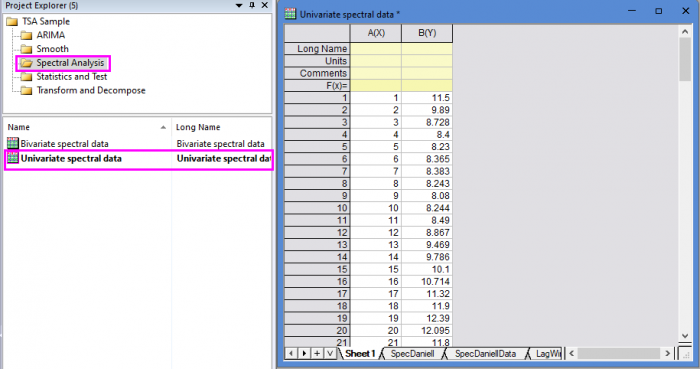
- Open the sample project file in Origin, go to Folder Spectral Analysis using the Project Explorer. Activate the workbook Univariate spectral data.
- Highlight column B in worksheet. Click the Time Series Analysis App icon
 in the Apps Gallery window.
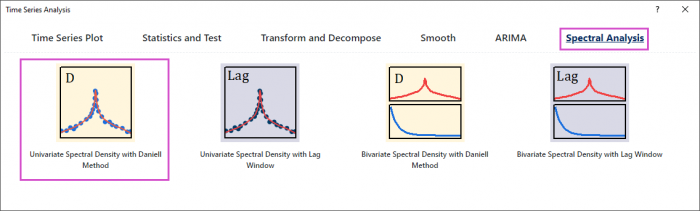
 - Choose Spectral Analysis tab. Click Univariate Spectral Density with Daniell Method icon to open the dialog.
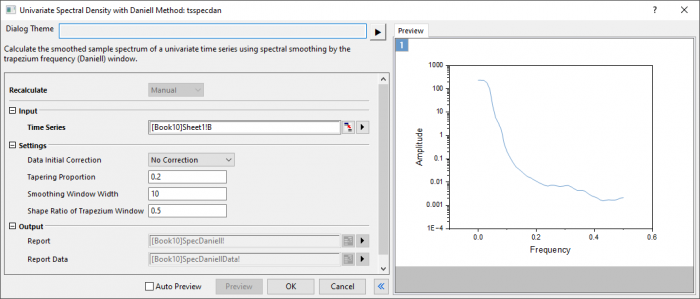
- In the Setting branch, choose No correction. Enter 0.2,10 and 0.5 in Tapering Proportion, Smoothing Window Width and Shape Ratio of Trapezium Window respectively.
- Click Preview button to display smoothed spectrum.
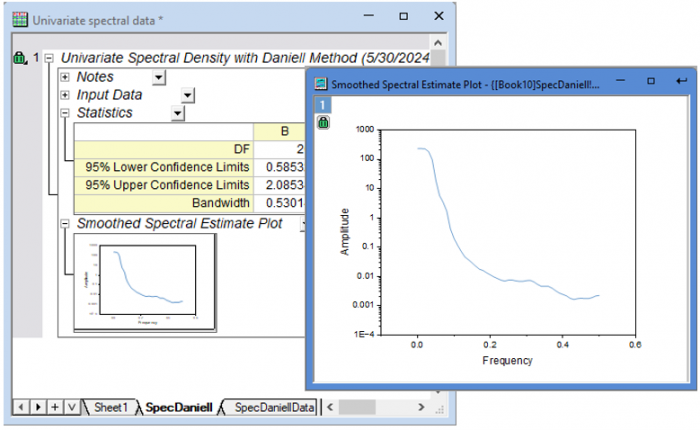
- Click OK button to output the report.
Algorithm
- Tapering factors
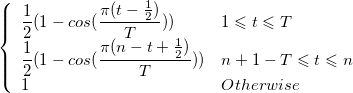
- where
![T=[\frac{np}{2}]](/tutorials/ja/images/Univariate_Daniell/math-7121a6cb9d2604fa18f655d01a516343.png "T=[\frac{np}{2}]") and
and  is the tapering proportion.
- Smoothed sample spectrum
- The unsmoothed sample spectrum
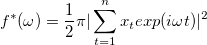
- is calculated for frequency values
![\omega_k = \frac{2\pi k}{K},k=0,1...,[K/2]](/tutorials/ja/images/Univariate_Daniell/math-9ace5450053b8f9c2e3d91498801af8b.png "\omega_k = \frac{2\pi k}{K},k=0,1...,[K/2]")
- where [ ] denotes the integer part.
- The smoothed spectrum is returned as a subset of these frequencies for which
 is a multiple of a chosen value
  , i.e.,
 ![\omega_{rl}=v_l=\frac{2\pi l}{L},l=0,1,...,[L/2]](/tutorials/ja/images/Univariate_Daniell/math-16b8cf51e33d19da91aaac244e4051e4.png "\omega_{rl}=v_l=\frac{2\pi l}{L},l=0,1,...,[L/2]")
- where

Reference