Lag Tool
Summary
The Lag tool is supported in the Time Series Analysis App. It is used to calculate lag or lead of a time series. This tutorial uses App's built-in sample project. To open this sample OPJU file:
- Right click the Time Series Analysis App icon
 in the Apps Gallery and choose Show Samples Folder.
 - A folder will open. Drag-and-drop the project file TSA Sample.opju into Origin.
Lag
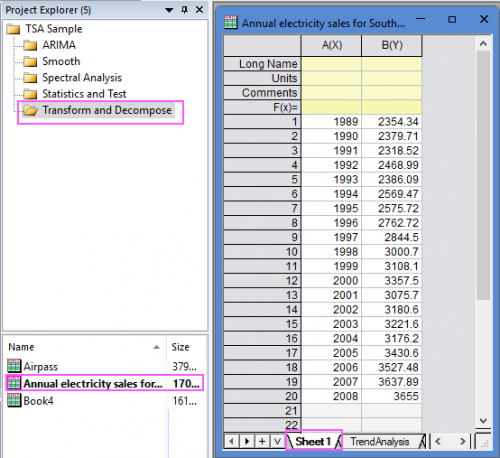
- Expand Project Explorer docked on the left. Select folder Transform and Decompose and go to sheet "Sheet1" in workbook "Annual electricity sales for South Australia from 1989 to 2008 - Copy".
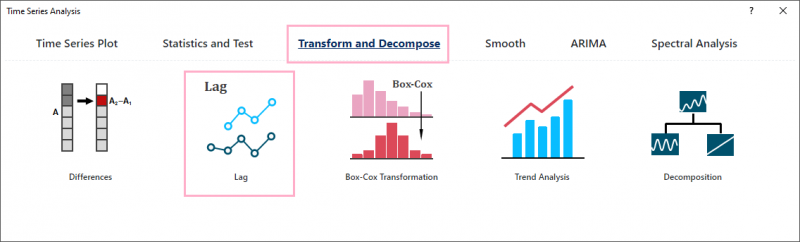
- Click the Time Series Analysis App icon in the Apps Gallery. Click the button Lag under the Tranform and Decompose tab to open the app dialog.
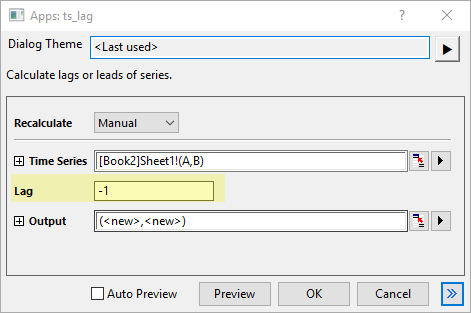
- Select the col(B) as Time Series; Enter -1 for Lag.
- Click OK button to perfrom the analysis.
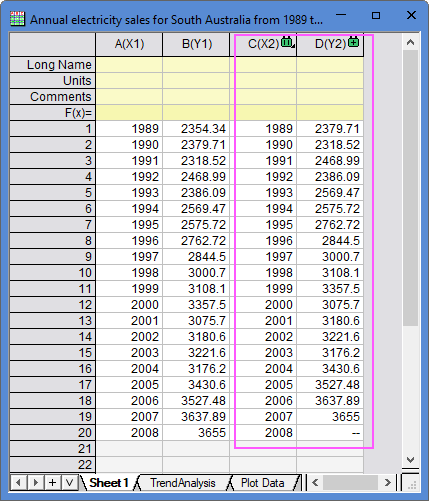
- The results are gotten by moving col(B) forward one row but keeping the original col(A).
Algorithm
Lag tool can shift a time series down by a number of rows.
Given a time series xi, i = 1, 2, ..., n, when lag k > 0, the first k elements in the result will be missing values, and the time series will be shifted down by k units. If k < 0, the last |k| elements in the result will be missing values, and the time series will be back shifted by |k| units.