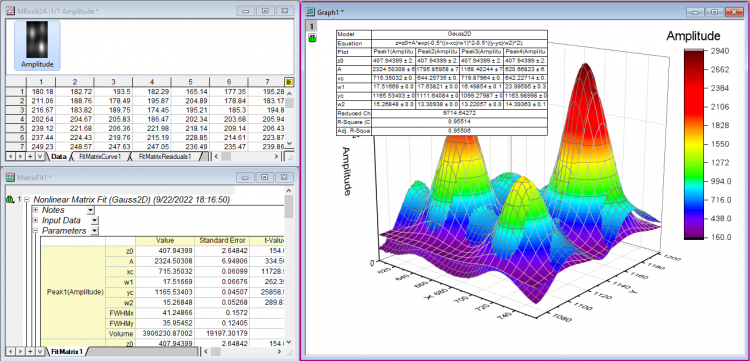
4.2.2.29 Surface Fitting with Multiple Peaks
SurfaceFit-MultiPeaks
Origin provides several built-in surface fitting functions under the Surface function category which can be used to perform fitting on 3D data. The surface fitting function is similar to the nonlinear fitting function.
Surface Fitting is only available in OriginPro.
Minimum Origin Version Required: OriginPro 9.0 SR0
What you will learn
- How to do surface fitting on a surface.
- How to fit the surface with multiple peaks.
Steps
This tutorial is associated with the Surface Fitting (Pro Only) folder in the Tutorial Data.opj (<Origin EXE Folder>\Samples\Tutorial Data.opj).
- With the matrixsheet active, select Plot: 3D> 3D Colormap Surface to plot a 3D graph.
- With the graph window activated, select Analysis: Fitting : Nonlinear Surface Fit... menu to open the NLFit dialog. Please note, if you started the fit from a matrix sheet, you have to select Analysis: Fitting : Nonlinear Matrix Fit... menu.
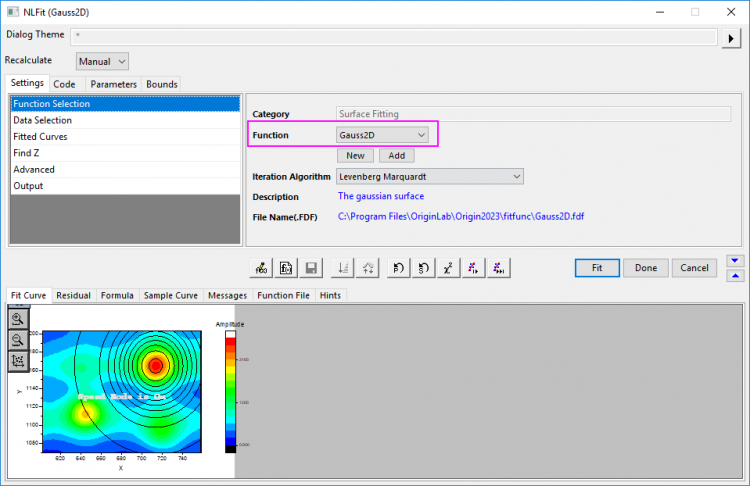
- Select Gauss2D from the Function dropdown menu.
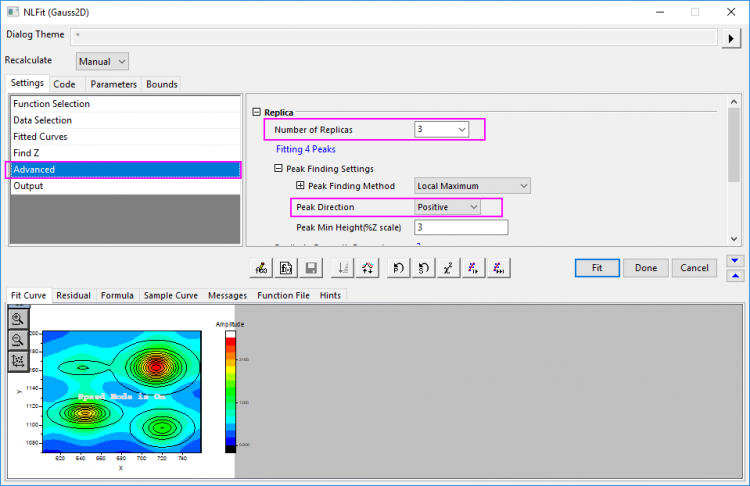
- Go to Advanced sub-tab, set Number of Replicas to 3, and set Peak Direction as Positive. You can see four peaks have been found.
- Click Fit to perform a multiple peak fit and generate a report worksheet with fitting results.