The Source Path for your files should be available on any computer your OPX is targeted for. The easiest way to do this is to make a subfolder of the Origin UFF. Any of the files and folders of the UFF can then be added to your OPX for distribution. So, create a subfolder named MyFunctions under the UFF.
Copy all the files to be packaged to the subfolder created in the last step. Here there is only a C file (MyCode.c). The function in this file is shown below.
void get_data_from_wks()
{
    Worksheet wks = Project.ActiveLayer();
    if( !wks )
    {
	out_str("Please keep a worksheet active with data");
	return;
    }

    // The following settings to set range as whole worksheet,
    // index offset is 0, -1 means last row/column.
    // Change r1, c1, r2, c2 to specify worksheet sub range,
    // for example, r1 = 0, c1 = 1, r2 = -1, c2 = 2 to
    // select all rows from column 2 to column 3.
    int r1 = 0; // first row
    int c1 = 0; // first column
    int r2 = -1; // last row
    int c2 = -1; // last column

    //construct a data range object from worksheet all data
    DataRange dr;
    dr.Add("X", wks, r1, c1, r2, c2);

    // get data from worksheet to vector by column one by one
    matrix mData;
    dr.GetData(mData); // get all data to matrix

    for(int nColIndex = 0; nColIndex < mData.GetNumCols(); nColIndex++)
    {
    	vector vOneCol;
    	mData.GetColumn(vOneCol, nColIndex);

    	double min, max;
    	vOneCol.GetMinMax(min, max);

    	printf("Maximum value of %d column = %f\n", nColIndex+1, max);
    }
}
Open the Package Manager by selecting Tools: Package Manager.... Then fill in the dialog as the following image shows.
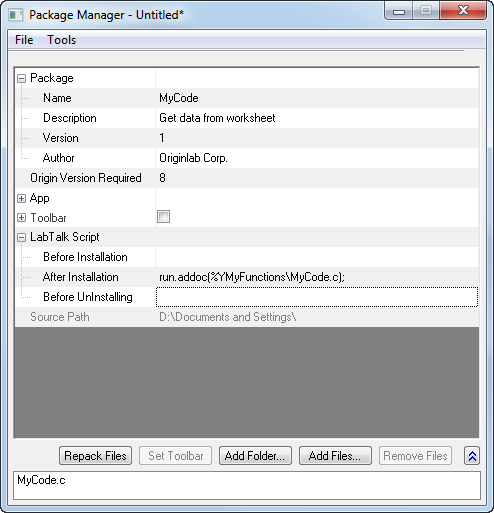
- The Module Name will appear as the name of the package for uninstall purposes.
- Origin Version Required means the minimum version of Origin required for this package. You want to enter the version number like 8.0988, and not like 8.0SR6.
- To force the Origin C source file to the System Folder Workspace, use the run.addoc() method in the After Installation branch of LabTalk Script. In this example, it looks like the following:
run.addoc(%YMyFunctions\MyCode.c);
- Click the Add Files or the Add Folder button and browse to and add any files required. In this example, browse to the subfolder (MyFunctions) under the UFF and add the C file (MyCode.c). Then the path of the UFF will show as the source path, and the files will list in the lower panel.
Select the File: Save menu of this Package Manager dialog. In the pop-up Save As dialog, enter a name (in this example, can be MyCode) for this package, and then save it as an OPX file.
Send the saved OPX file to other users. The user who gets this package can drag and drop the OPX onto Origin to install it, and then the functions in the C file are available.
- Drag and drop MyCode.opx onto Origin to install it. After installation, the function get_data_from_wks defined in MyCode.c can be used as a LabTalk command.
get_data_from_wks;