5.5.16.2.3.1 The Response Surface Design Dialog Box
Contents
Supporting Information
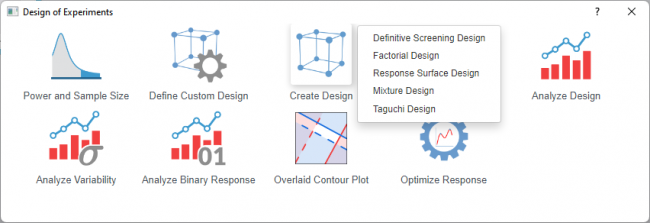
To open the Response Surface Design dialog
- Select Statistics: Quality Improvement: Design of Experiment from the Origin menu
- Select the Create Design icon and choose Response Surface Design from the list
 | Topics for Further Reading: |
Design Selection
Response Surface Type
Select a response surface type from the list below. Refer to the introduction and comparison for which type should be used for your design
- Central Composite
- Box-Behnken
Display Available Designs
Click the button for information to select an appropriate design. The table shows the number of factors and runs
Factors
| Number of Continuous Factors | Specify the number of continuous factors you want to include in the design |
|---|---|
| Number of Categorical Factors | Specify the number of categorical factors you want to include in the design |
| Continuous Factors table | Displays and defines the properties of each continuous factor — typically including name, low level, high level — establishing the experimental range for the numeric variables. |
| Categorical Factors table | If you select at least 1 categorical factor, the table will be shown. Displays and defines the properties of each categorical factor—typically including name, number of levels, and level labels — establishing the discrete settings for the qualitative variables. |
Setttings
For Central Composite
| Design Selection Table | Displays available design configurations based on the specified factors, showing options such as full factorial, fractional factorial, or hybrid designs with their corresponding run counts and resolution properties. |
|---|---|
| Number of Replicates | Sets how many times the entire design (or each run) is repeated to improve precision and estimate pure experimental error |
| Customize Number of center points | Enables manual override of the default center point allocation, allowing control over how many center points are placed in specific blocks |
| Number of Center Points per Block | Available only when Customize Number of center points is selected
|
| Customize Value of Alpha | Enables manual specification of the axial point distance |
| Alpha | Available only when Customize Value of Alpha is selected
The coded distance from the design center to each axial point, determining whether the design is rotatable, Spherical, face-centered or orthogonal, and even user-defined |
| Randomize Runs | Randomizes run order to eliminate bias from time trends or lurking variables. |
For Box-Behnken
| Number of Blocks | Divides the design into homogeneous groups to account for nuisance variables (e.g., different days, batches, or operators); Box-Behnken designs can often be arranged in orthogonal blocks to separate block effects from factor effects. |
|---|---|
| Number of Center Points per Block | Specifies how many center point runs are included in each block to test for curvature and provide a check on the consistency of response across blocks. |
| Number of Replicates | Sets how many times the entire design (or each run) is repeated to improve precision and estimate pure experimental error |
Output
| Design Table | Displays the complete experimental design matrix showing the factor level settings for each run |
|---|---|
| Coded Design | Shows the design matrix using coded units (-1 for low level, +1 for high level) rather than actual factor values. Useful for understanding the underlying structure and for standardized analysis. |
Dialog Theme
Save and load the settings of the dialog. Use this to store frequently used factor configurations, design options, or output preferences, then recall them for future designs without re-entering all values.