
If your data is a convolution of Gauss and Exponential functions, you can simply use built-in fitting function GaussMod in Peak Functions category to directly fit your data.
In this tutorial, we will show you how to define a convolution of two functions, and perform a fit of the data with non-evenly spaced X using this fitting function.
| If your data is a convolution of Gauss and Exponential functions, you can simply use built-in fitting function GaussMod in Peak Functions category to directly fit your data. |
Minimum Origin Version Required: Origin 9.0 SR0
This tutorial will show you how to:
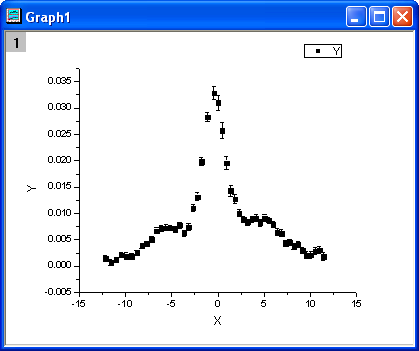
The fitting function is a convolution of two functions. It can be described as follows:

where  ,
,
 .
.And  ,
,  ,
,  , s,
, s,  ,
,  and
and  are fitting parameters.
  ,
,  ,
,  ,
,  and
and  are constants in the fitting function.
The fitting function can be defined using the Fitting Function Builder tool.
x0 = 3.1
xL = 6.3
tL = 0.4
s = 0.14
y0 = 1.95e-3
b1 = 2.28e-5
b2 = 0.2
Click Constants tab, set constants as follows:
w1 = 1.98005
xc1 = -0.30372
w2 = 5.76967
xc2 = 3.57111
A2 = 9.47765e-2
Click the  button on the right of the Function Body edit box and define the fitting function in Code Builder as follows:
Include header files,
#include <ONLSF.H>
#include <fft_utils.h>
Define the function body
  NLFitContext *pCtxt = Project.GetNLFitContext();
  if ( pCtxt )
  {
    // Vector for the output in each iteration.
    static vector vX, vY;

    static int nSize;

    BOOL bIsNewParamValues = pCtxt->IsNewParamValues();

    // If parameters were updated, we will recalculate the convolution result.
    if ( bIsNewParamValues )
    {
      //Sampling Interval
      double dx = 0.05;
      vX.Data(-16.0, 16.0, dx);
      nSize = vX.GetSize();

      vector vF, vG, vTerm1, vTerm2, vDenominator, vBase, vAddBase;

      double Numerator = tL * x0^2 * (xL^2 - x0^2);
      vTerm1 = ( (vX - xc1) * tL * ( (vX - xc1)^2 - xL^2 ) )^2;
      vTerm2 = ( (vX - xc1)^2 - x0^2 )^2;
      vDenominator = vTerm1 + vTerm2;

      //Function f(x)
      vF = (s/pi) * Numerator / vDenominator;

      //Function g(x)
      vG =  1/(w1*sqrt(pi/2))*exp(-2*vX^2/w1^2);

      //Pad zeroes at the end of f and g before convolution
      vector vA(2*nSize-1), vB(2*nSize-1);
      vA.SetSubVector( vF );
      vB.SetSubVector( vG );

      //Perform circular convolution
      int iRet = fft_fft_convolution(2*nSize-1, vA, vB);

      //Truncate the beginning and the end
      vY.SetSize(nSize);
      vA.GetSubVector( vY, floor(nSize/2), nSize + floor(nSize/2)-1 );

      //Baseline
      vBase = (b1*vX + y0);
      vAddBase =  b2 * A2/(w2*sqrt(pi/2))*exp( -2*(vX-xc2)^2/w2^2 );

      //Fitted Y
      vY = dx*vY + vBase + vAddBase;
    }

    //Interpolate y from x for the fitting data on the convolution result.
    ocmath_interpolate( &x, &y, 1, vX, vY, nSize );
  }
Click Compile button to compile the function body. And click the Return to Dialog button.
Click Evaluate button, and it shows y=0.02165 at x =1. And this indicates the defined fitting function is correct. Click Next.
0 < x0 < 7
0 < xL < 10
0 < tL < 1
0 <= s <= 5
0 < b2 <= 3
Click Finish.
| Note: In order to monitor the the fitted parameters, NLFitContext class was introduced in defining fitting function to achieve some key information within the fitter |
The fitted curve should look like:
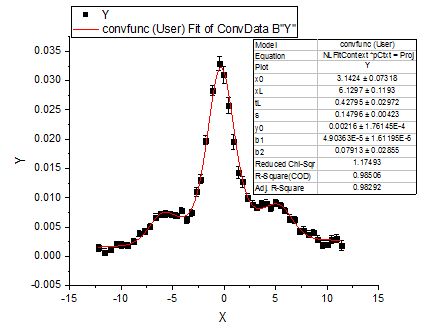
Fitted Parameters are shown as follows:
| Parameter | Value | Standard Error |
|---|---|---|
| x0 | 3.1424 | 0.07318 |
| xL | 6.1297 | 0.1193 |
| tL | 0.42795 | 0.02972 |
| s | 0.14796 | 0.00423 |
| y0 | 0.00216 | 1.76145E-4 |
| b1 | 4.90363E-5 | 1.61195E-5 |
| b2 | 0.07913 | 0.02855 |
Note that you can set a smaller value for dx in the fitting function body, the result may be more accurate, but at the same time it may take a longer time for fitting.