In some circumstance, one may want to create fitting function with multiple integrals:
We refer to Fitting with Integral using LabTalk Function for detailed description of parameters in the expression.
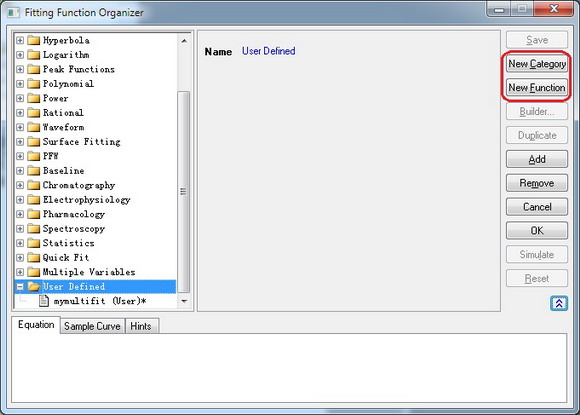
In version Origin 8.6, however, Fitting Function Builder just supports one integral in fitting function. Bypassing complex Origin C code, we can use Fitting Function Organizer to reach the goal.
In this tutorial, we will show you how to create a fitting function comprised of two integrals using function organizer. Of course, one can include more integrals as desired.
Minimum Origin Version Required: Origin 8.6
 | Beginning with Origin 2018b, you can define a an implicit function using integrals. |
This tutorial will show you how to:
The fitting model is described as below:

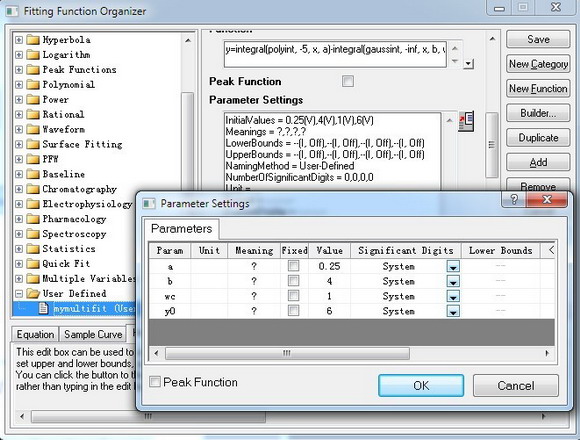
There are four parameters in the fitting function, and we need to pass three of them into the integrand, and use the independent variable as upper limit, to do integration.
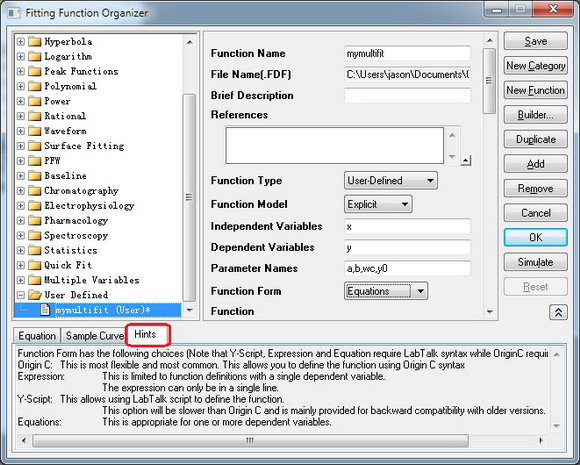
y=integral(polyint, -5, x, a)-integral(gaussint, -inf, x, b, wc)+y0
As described in Fitting with Integral using LabTalk Function, x, a, b and wc are parameters passed into the integrand functions.
function double polyint(double t, double ia)
{
	return ia*t ;

}


function double gaussint(t, ib, iwc)
{
	return ib *t* exp(-(t)^2/iwc^2) ;
}
Copy and paste the following data into Origin worksheet:
| X | Y |
|---|---|
| -3 | 2.47613 |
| -2.6 | 2.24016 |
| -2.2 | 2.01543 |
| -1.8 | 1.83094 |
| -1.5 | 1.85038 |
| -1.1 | 2.17725 |
| -0.9 | 2.44967 |
| -0.7 | 2.61423 |
| -0.5 | 3.02305 |
| -0.3 | 3.23057 |
| -0.1 | 3.37822 |
| 0.1 | 3.2827 |
| 0.3 | 3.18775 |
| 0.5 | 2.86194 |
| 0.7 | 2.69104 |
| 0.9 | 2.39315 |
| 1.4 | 2.04046 |
| 1.8 | 1.85287 |
| 2.2 | 1.85325 |
| 2.6 | 2.20569 |
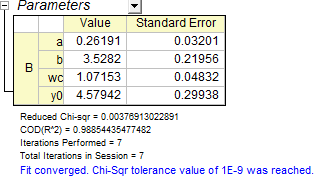
Highlight the Y column, and press Ctrl + Y to open the NLFit dialog. Select the function you just defined, and click fit button  to perform fitting.