5.5.16.2.2.1 The Factorial Design Dialog Box
Contents
Supporting Information
To open the Definitive Screening Design dialog
- Select Statistics: Quality Improvement: Design of Experiment from the Origin menu
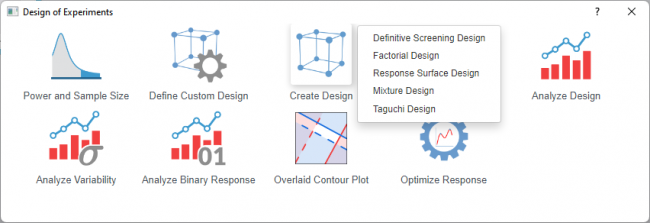
- Select the Create Design icon and choose Factorial Design from the list
 | Topics for Further Reading: |
Design Selection
Factorial Type
Select a factorial type from the list below. Refer to the comparison table for which type should be used for your design
| 2-Level Factorial | A design where every factor has exactly two levels (low and high). Examines all combinations or a fraction thereof to estimate main effects and interactions. |
|---|---|
| Plackett-Burman | A screening design with two levels per factor and run counts in multiples of 4 (e.g., 12, 20, 28). Each run changes roughly half the factors. |
| General Full Factorial | A design where factors can have any number of levels (not restricted to two). Examines all possible combinations of all factor levels. |
Generators
Only available when 2-Level Factorial is selected in the Factorial Type
| Default | Create a standard 2-level factorial designed |
|---|---|
| Custom | Use this when you need a specific alias structure, want to avoid confounding certain effects |
Display Available Designs
Click the button for information to select an appropriate design. The table shows the number of factors and runs
Factors
| Number of Factors | Specify the number of continuous factors you want to include in the design |
|---|---|
| Factor Table | Enter the design information of factors. That includes
|
Setttings
| Design Selection Table | Available only for 2-level factorial designs. Proivdes fractional and full factorial design |
|---|---|
| Generators | Available only when fractional factorial design is selected for custom 2-level factorial design.
Defines how additional factors are created from base factor interactions; determines the alias structure and resolution of the design. |
| Number of Center Points per Block | Available only for 2-level factorial designs
Specifies the number of center points (runs with all factors at their mid-levels) to include in the design. Center points detect curvature in the response without affecting the estimation of main effects or interactions; set to 0 if curvature is not a concern. |
| Number of Replicates | Sets how many times each factorial combination is repeated
Adding replicates can increase the statistical power to detect effects but also increase total runs and resource cost. |
| Number of Runs | Available only for Plackett-Burman designs.
Specifies the total number of experimental runs to include in the design. Plackett-Burman designs are available for run counts that are multiples of 4 (e.g., 12, 20, 24, 28, 36, 40, 44, 48 runs). Select the run count that accommodates your number of factors while minimizing experimental effort. |
| Number of Blocks | Available only for 2-level factorial designs.
Divides runs into groups to account for nuisance factors like different days or operators. |
| Define Block by Generators | Available only for 2-level factorial designs.
Lets you specify which interactions are confounded with blocks when using multiple blocks. |
| Fold Design | Available only for 2-level factorial designs.
Reverses signs of selected factors. This technique de-aliases specific effects in a fractional factorial design. For example, folding on factor A makes all two-factor interactions involving A estimable (aliased only with higher-order interactions), effectively increasing resolution for those terms |
| Randomize Runs | Randomizes run order to eliminate bias from time trends or lurking variables. |
| Ransom Seed | Enter a non-negative integer to control the random number generator |
Output
| Design Table | Displays the complete experimental design matrix showing the factor level settings for each run |
|---|---|
| Coded Design | Shows the design matrix using coded units (-1 for low level, +1 for high level) rather than actual factor values. Useful for understanding the underlying structure and for standardized analysis. |
| Alias Table | Available only for 2-level factorial designs
Displays the confounding (aliasing) structure of fractional factorial designs, showing which effects are confounded with each other. Critical for interpreting results from fractional designs where not all effects can be estimated independently. |
| Interaction Order for Alias | Available only for 2-level factorial designs
Specifies the maximum order of interactions to display in the alias table. |
Dialog Theme
Save and load the settings of the dialog. Use this to store frequently used factor configurations, design options, or output preferences, then recall them for future designs without re-entering all values.