5.5.16.2 Create Design
Introduction
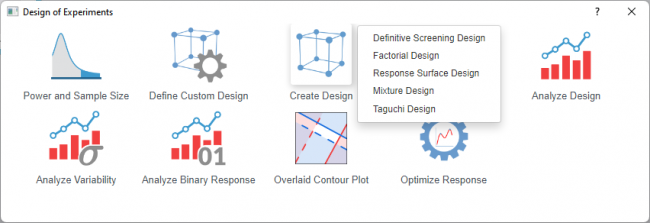
Use this feature to generate a new experimental design based on your study objectives and constraints. 5 design type is provided in Origin
| Definitive Screening Design | Factorial Design | Response Surface Design | Mixture Design | Taguchi Design | |
|---|---|---|---|---|---|
| Primary Purpose | Screen many factors with minimal runs while detecting curvature | Identify which factors significantly affect the response and estimate their interactions | Model curvature and find optimal factor settings | Optimize component proportions that must sum to 100% | Make processes robust to noise (minimize variation) |
| Number of Factors | 6+ factors (typically 6-20) | 2-15 factors | 2-6 factors (typically 3-5) | 2-10 components | 2-15+ control factors |
| Runs Required | Minimal (2k + 1 for k factors) | Moderate (2^k for full factorial, fewer for fractional) | Moderate to high (depends on model complexity) | Moderate (depends on model order and constraints) | Moderate to high (depends on inner/outer array) |
| Can Detect Curvature | Yes (quadratic effects estimable) | No (unless center points added) | Yes (primary purpose) | Yes (can fit quadratic models) | No (linear models only) |
| Can Estimate Interactions? | Limited (two-factor interactions partially confounded) | Yes (full factorial) or partially (fractional) | Yes | Special mixture terms, not standard interactions | Limited (focus on main effects) |
| Factor Types | Continuous | Categorical or continuous | Continuous (typically) | Continuous components | Categorical or continuous |
| Key Constraint | None specific | None specific | None specific | Components must sum to 1 (100%) | Separates control and noise factors |
| Optimization Focus | Screening + curvature detection | Effect identification | Finding optimal settings | Optimal blend proportions | Robustness to external variation |
| Typical Follow-up | Response surface design on significant factors | Full factorial or response surface design | Confirmation runs | None (often standalone) | Confirmation runs |
Processing
- Select Statistics: Quality Improvement: Design of Experiment from Origin menu
- Select the Create Design icon and choose a desired design from the list
|
Topics covered in this section: |