提示:此部分只提供英文原文,敬请谅解!
6.9.2 Baidu Map
Contents
 
|
 
|
Summary
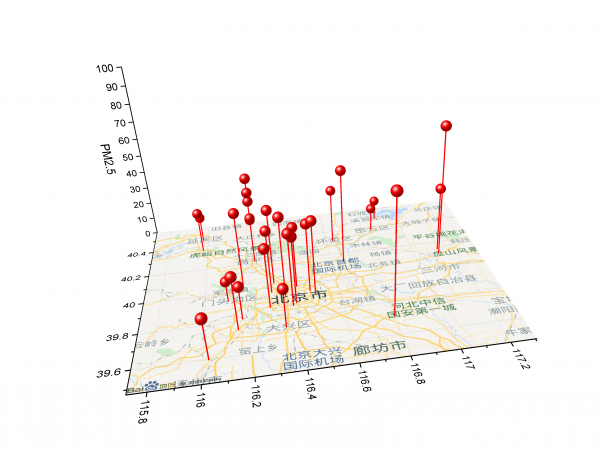
This tutorial will show you how to create a graph with baidu map as background. Baidu map is recommended if the desired background map is inside the boundary of China.
What will you learn
This tutorial will show you how to:
- download Baidu Map Import app from App Center.
- use the App to add Baidu map to a 3D graph.
Steps
- Start with a new project. With a blank workbook active, select from menu Data: Connect to Web. In the dialog, enter following URL link:
https://www.originlab.com/doc/Tutorials/Baidu-Map
Select table/_1 to import data from this page. There are PM 2.5 values of several observation points in Beijing city at mid-day of 18/11/2020. - Select column C header and click X on the mini toolbar that pops up. This sets column B as X. Similarly, set column E as Z.
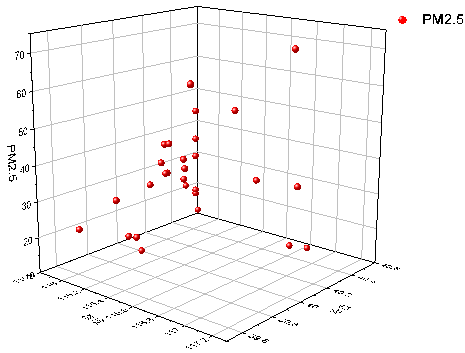
- Highlight column D and select menu Plot: 3D: 3D Scatter to make a 3D scatter plot.
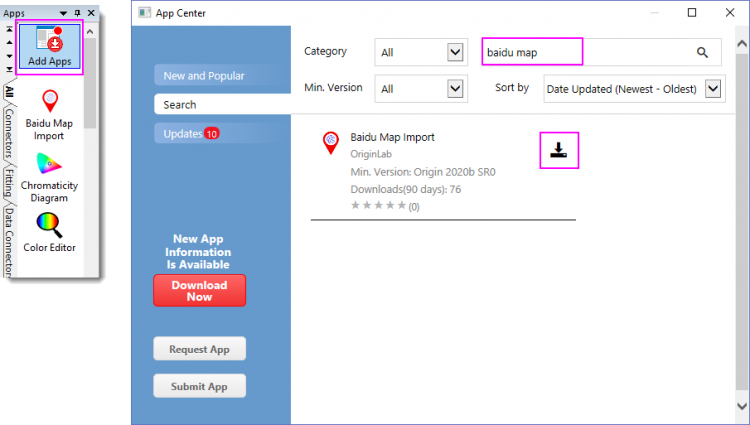
- Click Add Apps icon in Apps window that docks on the right side of Origin workspace and search baidu map. Click the download icon to download it.
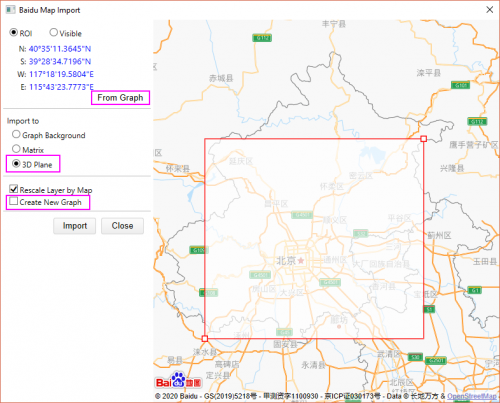
- With the 3D scatter graph window active, launch the Baidu Map Import app. Click the From Graph button first to relocate the ROI box to cover all the observations in the preview window. Change Map Type to 3D Plane. Clear Create New Graph checkbox. Then click Import button. Now The baidu map is added to the active graph as background in the XY plane. Close the App.
- Customize the graph. Double click the Symbol to open the Plot Details dialog.
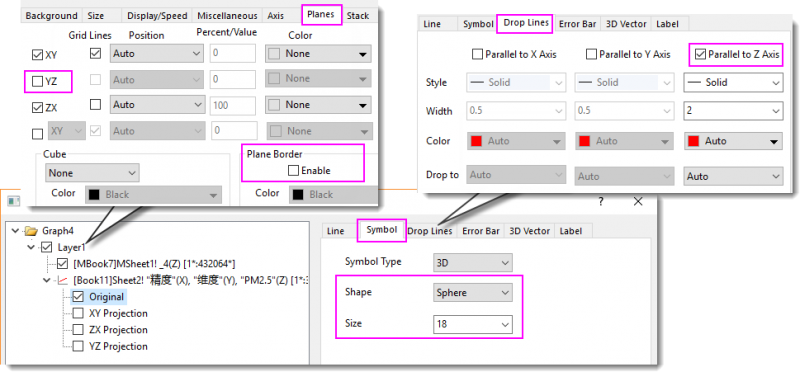
- Turn on drop lines to XY plane (plot level > Original branch > Drop Lines tab),
- Change symbol shape to Sphere and enlarge its size to 18 (plot level > Original branch > Symbol tab).
- Hide YZ plane and Plane Border (Layer level > Planes tab).
- Customize axes. Delete X&Y axis title. Select menu Format: Axes: Z Axis. In the Scale tab of Z Axis dialog, change scale From 0 To 100.
- Use 3D Rotation toolbar
 to rotate the graph to a desired angle.
Data
Observation Longitude Latitude PM2.5 DongSi 东四 116.23128 40.22077 42 GuanYuan 官园 116.35586 39.93239 45 Olympic Sports Center 奥体中心 116.41219 39.98538 35 Agriculture Exhibition Center 农展馆 116.46865 39.94429 39 WanLiu 万柳 116.29696 39.96706 36 Northern XiQu 北部新区 116.17035 40.04928 42 FengTai Garden 丰台花园 116.28371 39.86265 34 YunGang 云岗 116.162 39.81044 19 GuCheng 古城 116.23128 40.22077 37 FangShan 房山 116.14294 39.74788 30 DaXing 大兴 116.34159 39.72684 22 YiZhuang 亦庄 116.23128 40.22077 26 GuYi 顺义 116.65477 40.13012 54 ChangPing 昌平 116.23128 40.22077 50 MenTouGou 门头沟 116.10146 39.94048 12 PingGu 平谷 117.12141 40.14062 37 HuaiRou 怀柔 116.63177 40.316 32 MiYun 密云 116.84317 40.37625 14 YanQing 延庆 115.97503 40.45678 15 DingLing 定陵 116.23128 40.22077 27 BaDaLing 八达岭 115.9779 40.36214 24 MinYun Reservoir 密云水库 116.88429 40.47824 12 DongGao 东高村 117.11673 40.10479 73 YongLeDian 永乐店 116.79679 39.70886 66 LiuLi River 琉璃河 116.02432 39.59867 23 YongDingMenNei 永定门内 116.3993 39.87311 38 NanSanHuan 南三环 116.38432 39.85701 41 DongSiHuan 东四环 116.48972 39.91923 42