6.12.14 3D Scatter Plots with Confidence Ellipsoids
3D-TransParaSurf-Scatter
Summary
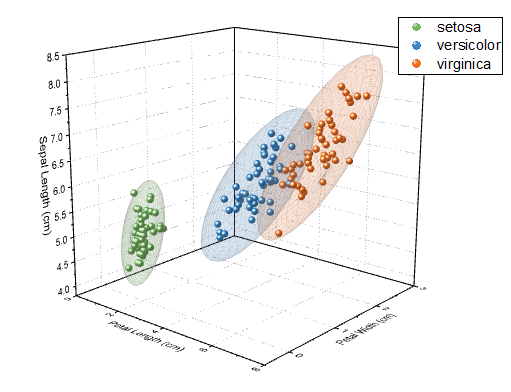
This tutorial will show you how to create a 3D Scatter plot, with symbol color indexed to values in a worksheet column. Then using OriginLab's free3D Confidence Ellipsoid app, you will draw a confidence ellipse around each point cluster.
Minimum Origin Version Required: Origin 2016 SR0
What you will learn
- How to create the 3D Scatter plot with symbol color indexing.
- How to add a free OriginLab App to your Apps Gallery and use the App to add confidence ellipsoids to your 3D Scatter plot.
Steps
Create the 3D Scatter plot with color index
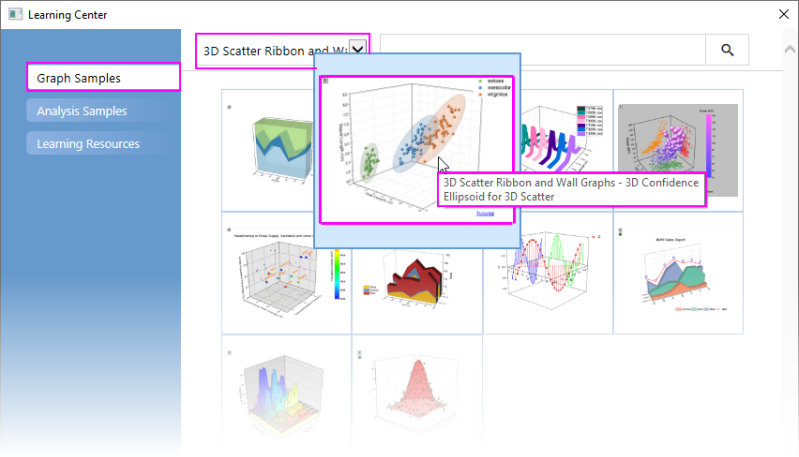
- Select Help: Learning Center menu or press the F11 key to open Learning Center. Select the Graph Sample tab and then select 3D Scatter Ribbon and Wall Graphs from the "Category" drop-down list. Double-click on the graph sample below to open the sample "3D Scatter Ribbon and Wall Graphs - 3D Confidence Ellipsoid for 3D Scatter".
Note: This tutorial is associated with the file <Origin EXE Path>\Samples\Statistics\Fisher's Iris Data.dat.
- Highlight columns A(X), B(Y) and C(Z) and click Plot> 3D: 3D Scatter to plot a 3D Scatter graph.
- Double-click on the graph to open the Plot Details dialog, select Original under the plot level in the left panel, then in the right panel select Symbol tab, change Color to By Points and set Color Options to Indexing : Col(E) : "Species". Choose a color list (the default list is fine).
- Right-click on the graph legend and select Legend: Reconstruct Legend in the context menu.
The 3D Scatter graph will be generated as shown below:

- To ensure that the legend is not overwritten during the next steps, select Format: Page in the menu to open the Plot Details dialog. Go to Legends/ Titles tab and set Legend Update Mode to None.

Add transparent confidence ellipsoids to the 3D scatter graph
- Press F10 to open the App Center, click the Search tab to the left, set Category to All and search for "ellipsoid". Download and Install the 3D Confidence Ellipsoid App (for more information, see this OriginLab File Exchange page: 3D Confidence Ellipsoid).
- Once installed, you will see the 3D Confidential Ellipsoid icon will be listed in the Apps Gallery:

- Activate the graph and click this 3D Confidential Ellipsoid button in the Apps Gallery. This will open the Plot 3D Confidence Ellipsoid dialog. Accept the default settings and click OK. Semi-transparent ellipsoids are added to each plot cluster, according to the color of each cluster.

The final graph should appear as shown below: