1.249 FAQ-1040 How to wrap legend text into multiple lines?
Last Update: 12/13/2022
- Right click legend, axis title or text object and choose Properties from context menu. On Frame tab, check Wrap Text, Adjust Height checkbox.
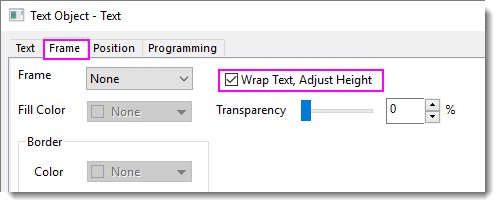
- Drag the 8 anchors to resize the legend/title/text to a proper width. The text will be wrapped into multiple lines and the frame height is adjusted automatically.
Note:
- When Wrap Text, Adjust Height is checked, you cannot change the text font size by dragging and resizing the object frame . In this case, please use the Mini Toolbar or Font Size buttons on the Standard toolbar.
- Additionally, when the Wrap Text, Adjust Height box is checked, you cannot arrange legend entries into multiple columns.
- It always breaks the text string at space. Please keep this in mind especially when you use this option in non-English system which doesn't use space to separate words, such as Chinese or Japanese.
|
Keywords:wrap text, multi-line, legend, axis title, text object, seperate line, divide line