1.210 FAQ-953 Why the position of the text object has changed after changing the layer size?
Last Update: 6/28/2018
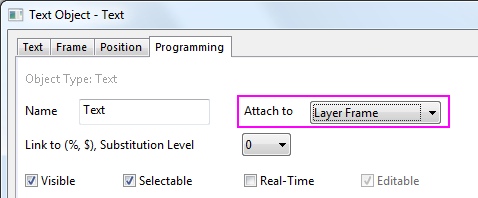
The text object is attached to layer by default, which means its position should change along with the layer size/position change. The layer can keep good looking even it is re-sized or re-positioned. If you find the position of a text object has changed after changing the layer size,
- Right-click on the text object to select Properties... from the context menu.
- In the Text Object dialog, activate the Programming tab.
- Check if Page is selected for Attach to drop-down list. If so, change it to Layer Frame or Layer and Scale.
Keywords:object position, relative position, change layer size, change position