1.313 FAQ-1237 How can I set the default layer size for graphs?
Last Update: 1/26/2026
If you want to assign a custom layer dimension for your graphs and thus save the layer size settings as a system theme, you may find that the settings is not applied to the new created graphs. This happens because the Graph Options dialog takes precedence over the system theme and overrides your theme-based settings.
To set your custom layer size as default,
- Select menu Preferences: Graph Options...
- In the Graph Options dialog, go to the Layout tab, and set Page Margin(%) to Auto, which means using the system theme for the layer size (margin).
- Click OK.
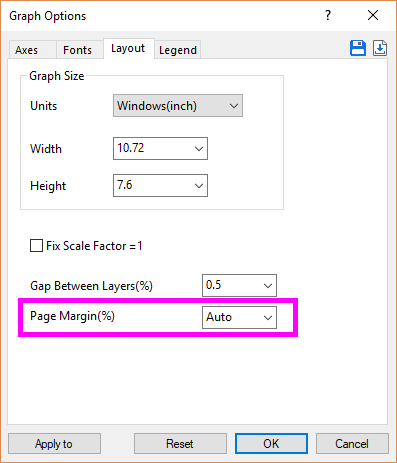
All new graphs will now inherit the layer dimension set in your system theme.
Keywords:page size, layer dimension, system theme, default size, graph width, graph height